
Save single or multi-paged TIFF files, append files, turn off prompting, and customize output settings & page editing features.
TIFF Image Printer
Convert to TIFF or TIFF Fax from any Windows document
Create color TIFF, monochrome TIFF, fax TIFF, and OCR images to text with our preconfigured system profiles, or create your own personal profiles.
Integrate TIFF conversion into your workflow by creating copies of the printer, assigning default profiles, and using our simple automation SDK.
Fast & Easy TIFF Conversion
Open – Print – Convert, it’s just that simple!
If you can print your file to a printer, then TIFF Image Printer can convert it into TIFF and create TIFF files. As a virtual Windows printer installed in the Devices and Printers folder, TIFF Image Printer can be accessed from any Windows application.
1
2
3
4
5
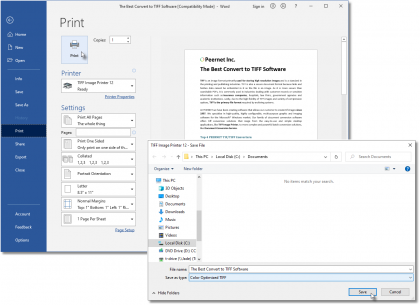
1
Select File-Print
2
Select TIFF Image Printer 12
3
Click Print
4
Select profile
5
Click Save
1
2
3
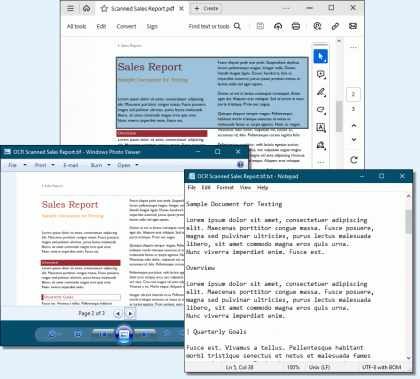
1
Open and print your scanned PDF document
2
Your TIFF image is created
3
Text from the image is extracted and editable
Optical Character Recognition (OCR)
Create Editable Text from Scanned Documents and Images
Transform images into editable and searchable documents. Create hOCR, ALTO, and Text files along with your TIFF image. Recognize English, French, Italian, German, Spanish, Arabic, Hebrew, and Hindu, with other languages easily added.
Edit & Create Profiles
Create the exact TIFF file that you need.
TIFF Image Printer specializes in producing the exact TIFF file you require, offering customizable TIFF specific properties not available in other products. Edit your output settings using Profile Manager to create a personal profile to apply during conversion.
1
2
3
4
5
6
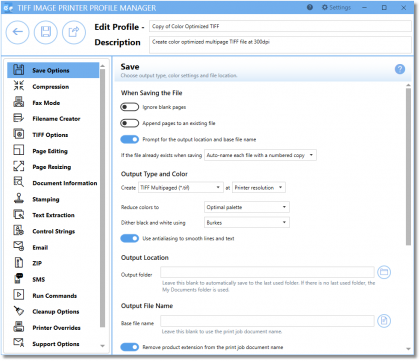
1
Name profile
2
Create TIFF Multipaged or TIFF Serialized
3
Merge TIFF
4
Turn off prompting
5
Create faxable TIFF
6
Add watermark
1
2
3
4
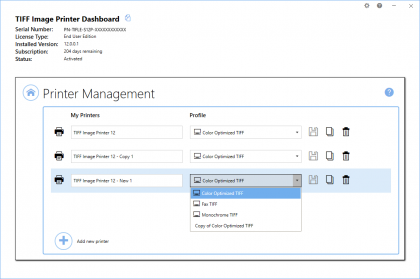
1
Change default profile
2
Copy printer
3
Add new printer
4
Rename printer
Manage Printers
Edit, copy & create new printers.
Quickly manage your printer settings directly from the Dashboard. Printer Management allows users to change the default profile TIFF Image Printer uses to create output files, add new copies of the printer, and rename or delete existing printers.
Everything In One Place
Access all tools from the Dashboard.
The TIFF Image Printer Dashboard is the control center which brings all the tools for creating and editing profiles, managing printers, accessing help resources and product activation together in one place. Great place to quickly check your subscription expiry date or get notified about new updates.
1
2
3
4
5
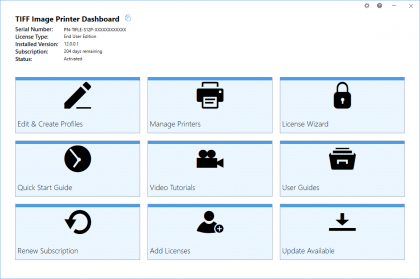
1
Open profile manager
2
Open printer management
3
Edit activation status
4
Access help resources
5
Check for updates
Support Platforms
- Windows 11 / Windows Server 2025, 2022 and 2019
- Windows 10 / Windows Server 2016
- Windows 8.1 / Windows Server 2012 and 2012 R2
- Windows 7 / Windows Server 2008 R2

Related Solutions
PEERNET’s family of image printer drivers, TIFF Image Printer, PDF Image Printer and Raster Image Printer, all share the same user interface, functionality, and settings as applicable.
Where TIFF and PDF Image Printer only support TIFF creation and PDF creation respectively, Raster Image Printer supports multiple formats including TIFF, PDF, JPEG, PNG, DCX and others. We recommend Raster Image Printer if you foresee a need to create both TIFF and PDF, or any other image formats.
The PEERNET team is always happy to help!
Give Us a Call
1-800-883-7980
Ask Us a Question
Complete our contact form
LATEST NEWS
 PNSrv11Lib to PNSrv12Lib: Migration Made EasyMarch 14, 2025 - 2:10 pm
- Migrating to Version 12: Compatibility Mode Quick Start GuideMarch 14, 2025 - 2:09 pm
- Well Logs: Stitch PDF Pages into a Continuous TIFF ImageMarch 14, 2025 - 2:08 pm
- Dynamic Stamp ContentNovember 4, 2024 - 4:47 pm


