Home > Products > Raster Image Printer
|
http://www.peernet.com/download/PNEPROSetup.php Raster Image Printer 7.0.004 |
|
Buy Now To Get The Full Version |
|
Quick Start Guide Learn how to use the Raster Image Printer and start converting today! |
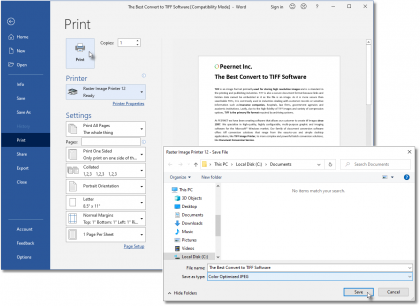
The Raster Image Printer makes converting documents to 30+ industry-standard raster image file formats, like JPEG, PDF, TIFF, GIF, and PNG, easy. Click Image Formats for a complete list.
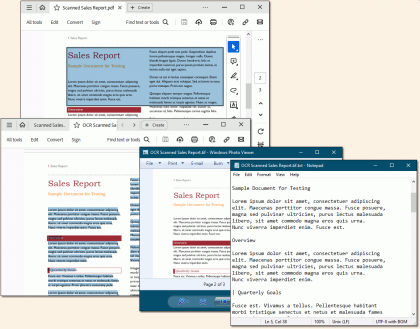
After converting documents into image files, you can share, archive or (automatically) attach them to email messages as virus-free attachments.
Unlike competing products that offer a multitude of obscure and obsolete file formats, this virtual printer specializes in producing the exact image you require (be it JPEG, PDF, TIFF, GIF, PNG, or any other) through it’s customizable image-specific properties not found in competing products.
It's just that EASY! If you can print it, you can convert it to JPEG, PDF, TIFF, GIF, PNG, and more.
Complete control over the file size and image quality of the raster image files created.
The image printer is configured to produce good quality pictures upon install, but there are times when you need to
control the size of the file or the quality of the image produced. Increase the printer’s resolution (to a maximum
of 600 DPI) to increase the quality of the image, or lower the resolution (to a minimum of 50 DPI) to create a smaller
sized image.
Save space with automatic color options – the fewer the colors, the smaller the file.
The image printer takes the guesswork out of selecting the color mode the image is stored in when performing convert to JPEG,
PDF, TIFF to name a few. Without affecting the image quality, the virtual printer can automatically reduce your document
image to the fewest number of colors possible. This option is easily changed if you always need true color, greyscale or
monochrome images.
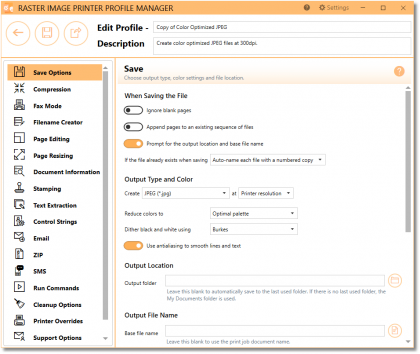
Customize the image file format options to get the exact file you need, every time.
For certain types of applications, such as archival, fax, or proprietary systems, the type of image file that needs to be
used is restricted in format and compression type, and will be rejected if it does not match. The PEERNET ePro printer
provides the ability for you to specify the image format and compression that must be generated in order to guarantee
these files will be accepted by these systems every time!
Advanced file naming convention
If your files need to follow a specific naming convention or be stored in a certain location, the PEERNET Multi-Format
Image Printer advanced file naming ability can be easily configured to meet your needs – be it for an archival,
fax or other proprietary system.
Ultimate control and tight integration with YOUR workflow process.
To streamline or automate any process, the PEERNET raster driver provides several points in its file creation process that
allows you to attach your own processing logic that will run or be invoked before or after the creation of your raster image
file(s). Take advantage of what others have done to save money every day.
The following guides and FAQ's are also available for further assistance.
- Quick Start Guide
- User Guide
- PEERNET Forum, search our knowledge base of frequently asked questions.
Click and download samples to see how to:
Print without user interaction
Change settings on the fly
Integrate your own custom processing
- Microsoft Visual Basic example showing how to convert Word documents from one folder to another folder.
- Microsoft C# .NET example that listings to Word documents being dropped into one folder and converts them to JPEG and places results in another folder.
- Microsoft MFC C++ example show how to convert Word documents from one folder to another folder.
- UserExits example of how to write User Exits.
If you are using Raster Image Printer 7.0 to produce only TIFF Images we offer an upgrade path to TIFF Image Printer 8.0. The TIFF Image Printer 8.0 focuses on producing exactly the TIFF format you require by offering customizable TIFF specific properties
As a registered owner of Raster you can purchase the latest version of TIFF Image Printer at a discounted price. Please visit the following forum discussion for discount rates and complete steps on how to upgrade immediately online.
Download the latest update from the link below.
http://www.peernet.com/download/PNEPROSetup.php
Raster Image Printer 7.0.004 - February, 2008
The installation of an update will not affect your existing license.
| Windows 7 | ![]() |
![]() |
![]() |
| Windows 2008 R2 | ![]() |
![]() |
![]() |
| Windows 2008 (up to SP2) | ![]() |
![]() |
![]() |
| Windows Vista (SP2) | ![]() |
![]() |
![]() |
| Windows Vista | ![]() |
![]() |
![]() |
| Windows 2003 (SP2) | ![]() |
![]() |
![]() |
| Windows 2003 (up to SP1) | ![]() |
![]() |
![]() |
| Windows XP (SP3) | ![]() |
![]() |
![]() |
| Windows XP (up to SP2) | ![]() |
![]() |
![]() |
| Windows 2000 (up to SP4 - Rollup # 1) | ![]() |
![]() |
![]() |
| Windows 2000 (up to SP4) | ![]() |
![]() |
![]() |
| Windows NT (up to SP6) | ![]() |
![]() |
![]() |
| Windows 95/98/ME | ![]() |
![]() |
![]() |
The Raster Image Printer 7.0 is the upgrade path for PEERNET.DRV ePRO 5.0 and 6.0.
As a registered owner of an earlier version you can purchase the latest version at a discounted price. Please visit the following forum discussion for discount rates and complete steps on how to upgrade immediately online.
To view history and supported platform details on Version 6.0 and 5.0 click here.
Update Raster Image Printer 7.0.004 - February, 2008
Resolved issue when Microsoft .NET 3.0 framework is installed on Windows XP and Windows 2000 operating systems prior to installing the Raster Image Printer. Installing the Raster Image Printer after .NET 3.0 framework caused XPS Printer to stop working.
Improved speed of installation.
Update Raster Image Printer 7.0.003 - November, 2007
Minor release to support faster computers.
Update Raster Image Printer 7.0.002 - August, 2007
Enhanced support when printing in monochrome to improve readablity of black and white documents.
The Remove filename extension option has been added to this printer. You option determines whether the file extension is removed before adding on the default output file extension.
Released Raster Image Printer 7.0.001 - August, 2007
|
Raster Image Printer fully supports Windows Vista both 32-bit and 64-bit editions and 64 bit support for Windows XP and 2003.
Raster Image Printer fully supports Windows Office 2007.
Raster Image Printer fully supports Internet Explorer 7 including the new protected mode.
Added support for Windows XP Professional x64 Edition and Windows 2003 x64 Edition that supports both AMD64 and Intel Extended Memory 64 Technology (EM64T). This product does not support Itanium-based Systems.
Added support for Windows 2003(SP2)
All processing of strings and file names are now fully UNICODE compliant throughout the architecture. This resolves several issues on Chinese and Japanese Windows as well as other version of Windows using UNICODE languages.
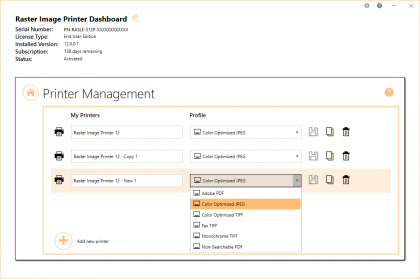
Added a Copy Printer program that supports creating copies of the Raster Image Printer 7.0 and makes it a breeze to create copies of the printer with different default settings.
In order to control the number of jobs being converted at a time by the Raster Image Printer 7.0, there is now a Set Max Jobs command. It sets a registry key value that controls the number of jobs that can be executed in parallel. There by, preventing too many jobs from running at the same time.
The Raster Image Printer 7.0 processing model is identical to the PEERNET.DRV ePRO 6.0 printing model. The default installation is the same, to spool document and start printing immediately. The script file and control file names have changed from PNEPRO6S.ini, PNEPRO6C.ini to PNEPRO7S.ini and PNEPRO7C.ini, respectively.
A new name, Raster Image Printer was chosen to replace PEERNET.DRV ePRO in order to better reflect the main purpose of the application and to highlight the fact this driver does not support older versions of the Microsoft Windows operating systems. Owners of PEERNET.DRV ePRO can upgrade to the Raster Image Printer at a discounted price.
Raster Image Printer support Windows 2000 and up. It does not support older Microsoft Windows versions such as NT 4.0, Windows 95, 98, 98 SE and ME.
Raster Image Printer 7.0 was developed and supports Microsoft® Windows Vista, Windows 2003(up to SP2), Windows XP(up to SP2) and Windows 2000(up to SP4)Rollup#1.
Raster Image Printer 7.0 can be licensed on Microsoft® Windows Vista, Windows 2003, Windows XP and Windows 2000.
|
User Edition |
|
|
|
Site or Enterprise Edition To obtain a quote and more details about Site and Or Enterprise License please email your request to peernet@peernet.com. A PEERNET Sales Representative will contact you with pricing and further details, generally within the same day. |
|
Upgrades As a registered owner of an earlier version you can purchase the latest version at a discounted price. Please visit the following forum discussion for discount rates and complete steps on how to upgrade immediately online. If you are using Raster Image Printer 7.0 to produce TIFF Images we offer an upgrade path to TIFF Image Printer 8.0. The TIFF Image Printer 8.0 focuses on producing exactly the TIFF format you require by offering customizable TIFF specific properties As a registered owner of Raster you can purchase the latest version of TIFF Image Printer as an upgrade. |
|
Resellers |
Raster Image Printer 7.0 evaluation version operates for 30 days on all supported platforms. All features are fully functional with the exception that all outputs are stamped with the phrase "Evaluation Copy".
To remove the Evaluation Copy stamp, you must purchase the product.
Press the Start Download button below to start your download.
When installed the Quick Start Guide for Raster Image Printer will appear on your desktop. This guide will provide you instructions on how to work with and license the Raster Image Printer.
|
|||||||
|
|||||||
|