Home > Products > PDF Creator Plus
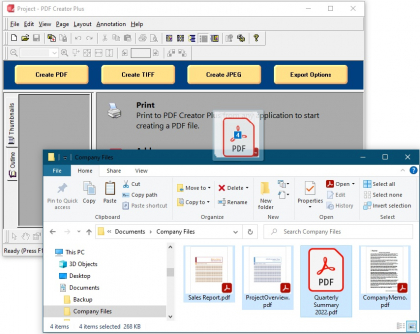
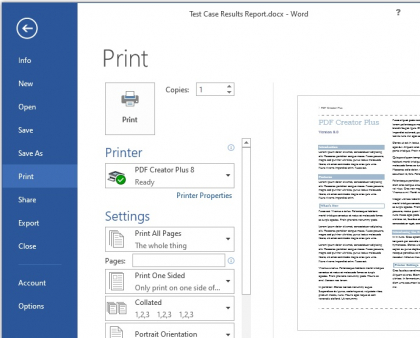
PDF Creator Plus makes PDF creation as easy as printing. PDF Creator Plus combines a virtual printer with a preview application that displays your printed document before the PDF is created. From the preview application you can create a PDF from a single document or leave the preview open and continue printing to build a PDF from multiple documents.
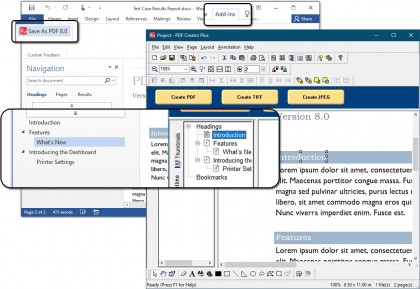
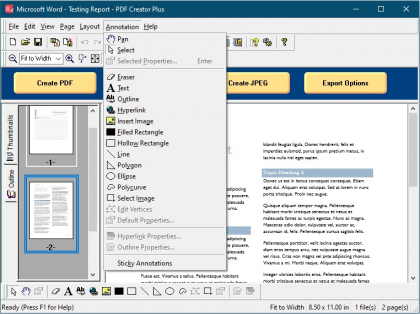
Create PDF documents from Microsoft Word with your headings, outlines and hyperlinks intact by using the Save as PDF Add-In included with the product. In the preview window, the annotation tools allow you to add new or edit existing headings, bookmarks and hyperlinks.
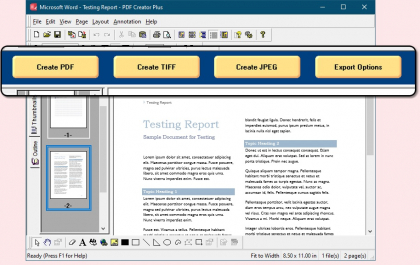
The preview window is more than just a preview – it is also includes common editing features. You can rearrange, add, copy or delete pages before creating your PDF. The included annotation tools can be used to add notes and graphics to highlight important areas in your document. You can even save your printed pages as a PDF Creator Plus project file so you can revise your PDF at any time.
As an added bonus, PDF Creator Plus is not limited to creating only PDF documents. In addition to PDF, you can also create TIFF, JPEG, Windows BMP images, and placeable Enhanced Metafile (EMF) files.
Merge Multiple Documents |
Easily combine documents from different applications into a single PDF file. Microsoft Office documents, emails, web pages, and files from any application that can print – PDF Creator Plus can handle them all. |
Keep Microsoft Word Hyperlink and Outline Information |
Use the Save As PDF add-in for Microsoft Word to create PDF documents with all the headings, bookmarks and hyperlinks intact. You can also use the annotation tools in the preview application to add and edit headings, bookmarks and hyperlinks |
Works from any Windows Application |
You only need one program to be able to convert from any Windows application. If you can print from your Windows program, then PDF Creator Plus can create a PDF. |
Preview Application Includes Editing Features |
Each time you print your printed pages are displayed in a preview application. Leave the preview application open and continue printing to build PDF documents from multiple files. |
Powerful set of Annotation Tools |
Use the preview application’s annotation tools to add notes and graphics to highlight important areas, or mask out information that may be sensitive. |
Combine and Reorganize Pages |
Use the preview application to combine, rearrange, add, copy or delete any pages before you create your PDF. Easily combine and manage documents of different paper sizes (letter, legal etc) and orientations. |
Multiple Conversion Types |
PDF Creator Plus is not limited to just creating PDF files; you can also create TIFF, JPEG, BMP and EMF files. |
Custom Image Compression |
Keep your file size small by choosing the best compression method for the type of images in your document. |
For more information review the complete list of features.
The following guides and FAQ's are also available for further assistance.
If you still have questions please email your issues to support@peernet.com or call us at 1-800-883-7980 or 613-224-6894 to speak to a support representative directly.
We pride ourselves on providing the best support and the fastest response time in the industry, generally responding on average within 2 hours. Please submit the support request form or email your issues to support@peernet.com or call us at 1-800-883-7980 or 613-224-6894 to speak to a support representative directly.
PEERNET technical personnel are available to answer your questions from 09h00 to 17h00, Monday through Friday, Eastern Standard Time (excluding statutory holidays).
Free unlimited support is provided for the full evaluation period and 60 (sixty) days from the date of purchase. For a minimal extra fee On-Going Support (OGS) can optionally be bought at the time of purchase. OGS provides unlimited telephone and email support as well as automatic access to all minor and major releases including upgrades for the term of the agreement. The terms of your OGS contract is found on your purchase confirmation.
If you are Registered User, please include your serial number in any support request, this will facilitates the support process.
How do I find my serial number?
Download the latest update from the link below.
http://www.peernet.com/download/PNEPUBSetup.php
PDF Creator Plus 4.0.014 - September, 2007
The installation of an update will not affect your existing license.
| Windows 7 - Ready | ![]() |
![]() |
![]() |
| Windows 2008 R2 - Ready | ![]() |
![]() |
![]() |
| Windows 2008 | ![]() |
![]() |
![]() |
| Windows Vista SP1) | ![]() |
![]() |
![]() |
| Windows Vista | ![]() |
![]() |
![]() |
| Windows 2003 (SP2) | ![]() |
![]() |
![]() |
| Windows 2003 (up to SP1) | ![]() |
![]() |
![]() |
| Windows XP (SP3) | ![]() |
![]() |
![]() |
| Windows XP (up to SP2) | ![]() |
![]() |
![]() |
| Windows 2000 (up to SP4 - Rollup # 1) | ![]() |
![]() |
![]() |
PDF Creator Plus 3.0 and 2.0 does not support and cannot be licensed on Windows Vista, as Windows Vista support was introduced in version 4.0.
The PDF Creator Plus 4.0 is the upgrade path for PDF Creator Plus 3.0 and 2.0.
As a registered owner of an earlier version you can purchase the latest version at a discounted price. To upgrade please sign into your account, PEERNET Store, if you don’t have an account (new since summer 2006) you will be required to set up a new account and register your existing product serial number or select "View the products I have registered or purchased" in order to be presented with the option to upgrade your existing product.
When your upgrade has been completed you will receive a new serial number and link to download the new version.
To view history details on Version 3.0 & 2.0 click here.
Update PDF Creator Plus 4.0.014 - September, 2007
Corrected an issue with missing and/or wrong color lines when printing from Claris.
Update PDF Creator Plus 4.0.012 - May, 2007
Minor fix to correct problem being experienced by AutoCad users.
Update PDF Creator Plus 4.0.011 - April, 2007
Fixed crash with PDF embedded Fonts when documents printed from Adobe Acrobat to PDF Creator Plus.
Enhanced support for simulating fonts when the based on font does not exists. This is to mimic the font in the same manner as Microsoft Windows does when you select a font turn change to bold, italic, bold italic or normal but the underlying font file contains only information for one of these combinations.
Fixed issue with no font match being made when R2_MASKPEN is selected.
Added PlgBlt support in order to fix an issue when Auto CADD is using this graphic operation to rotate and flip images.
Fix issue with clipping in PDF by not using soft mask. The soft mask does not include destination clipping and therefore does not work in all cases.
Fixed issue where Bezier Curve was not being reconstructed correctly in the PDF file being generated by PDF Creator Plus.
Update PDF Creator Plus 4.0.005 - March, 2007
Fixed issue with Poly Bezier graphic operation when converting to PDF. The curve/arc was being closed and filled. It is now only being stroked by the current pen.
Update PDF Creator Plus 4.0.004 - February, 2007
Fixed watermark problem when printing, introduced with 4.0.003.
Rectified issue where on occassion certain black and white images results were inverted.
Resolved hanging problem during installation that occured randomly.
Update PDF Creator Plus 4.0.002 & 4.0.003 - February, 2007
Fixed rendering problem for some CAD users.
Corrected some minor bug fixes.
Update PDF Creator Plus 4.0.001 - January, 2007
Enhanced support for Word 2007.
Released PDF Creator Plus 4.0 - December, 2006
|
PDF Creator Plus fully supports Windows Vista both 32-bit and 64-bit editions and 64 bit support for Windows XP and 2003.
PDF Creator Plus fully supports Windows Office 2007.
PDF Creator Plus fully supports Internet Explorer 7 including the new protected mode.
Fixed random problem where printing to PDF Creator Plus would launch the application but no pages would be loaded.
Fixed problem with annotations moving to the next page when pages were marked for deletion.
PDF Creator Plus 4.0 was developed and is licensed for Microsoft® Windows Vista, Windows 2003, Windows XP and Windows 2000.
|
|||||||||||||||||||||
|
For organizations with a large number of users, or running Citrix Servers or Terminal Servers, we highly recommend a Site or Enterprise license be purchased in order to eliminate individual activations. Please submit a price request and a PEERNET Sales Representative will contact you with a pricing proposal. Site Edition Permits the activation of an unlimited number of users on computers that are physically situated at a single address (site). Enterprise Edition Permits the activation of an unlimited number of users on computers throughout one (1) Enterprise regardless of the number of users and/or site locations. |
Upgrades and Support
All purchases currently include Free unlimited support for 60 (sixty) days from the date of sale. For a minimal extra fee On-Going Support (OGS) can optionally be bought at the time of purchase. OGS provides unlimited telephone and email support as well as automatic access to all minor and major releases including upgrades for the term of the agreement. The terms of your OGS contract is found on your purchase confirmation.
As a registered owner of an earlier version you can purchase the latest version at a discounted price. To upgrade please sign into your account, PEERNET Store, if you don’t have an account (new since summer 2006) you will be required to set up a new account and register your existing product serial number or select "View the products I have registered or purchased" in order to be presented with the option to upgrade your existing product.
When your upgrade has been completed you will receive a new serial number and link to download the new version.
PDF Creator Plus 4.0 evaluation version operates for 30 days on all supported platforms. All features are fully functional with the exception that all outputs are stamped with the phrase "Evaluation Copy".
To remove the Evaluation Copy stamp, you must purchase the product.
Press the Start Download button below to start your download.
When installed the Quick Start Guide for PDF Creator Plus will appear on your desktop. Just open it to get started quickly.
LinkLeads.com - Advertise on other websites by exchanging links with similar sites. Join our FREE worldwide search engine and boost your visitor traffic today by receiving Link Leads.