|
Supported
|
||
|
|||
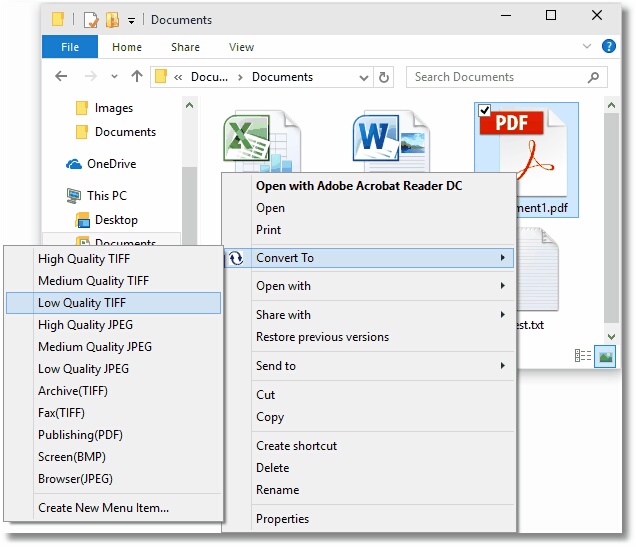
File Conversion Center makes converting documents easy. Fully integrated into your desktop, any number of file and folders can be converted as easily as you would copy, paste or delete them.
Able to convert Microsoft Office documents such as Word, Excel and PowerPoint files, Adobe PDF files, PostScript files, HTML files and web pages, as well as other popular file formats into non-searchable Adobe PDF documents, TIFF, JPEG and other image file formats, File Conversion Center is an indispensable tool for all your conversion needs.
| Just right-click on a file or folder in Windows Explorer and select a conversion option from the Convert To menu to begin converting |
![]() |
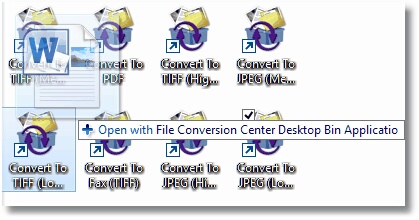
| You can also drag and drop the files and folders onto a desktop converter bin, one of the Convert To icons installed on your desktop. |
![]() |
It's that simple. With File Conversion Center you can also:
Powerful Batch Processing Capabilities |
Convert any number of files, folders, and web addresses. Pause, resume, skip a file or cancel the conversion process from the progress dialog. |
Desktop Integration |
Integrated into both your desktop and your Windows Explorer application, you can convert individual files or groups of files on demand, quickly and easily. |
Dynamic List of Supported File Types |
Convert any file that can be opened and printed by any of the supported applications. As new file extensions are encountered that can be opened, they are added to the list of files types that can be converted. |
Customizable Conversion Settings |
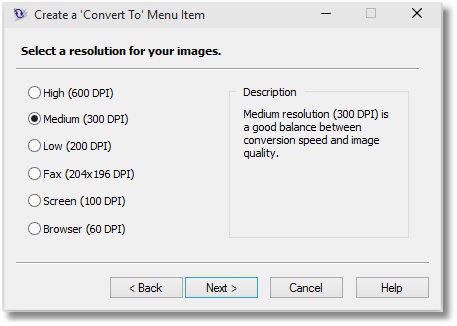
Custom conversion settings can be created to meet your specific needs; output file type, resolution, color, serialized or multi-paged files, compression options and output file location, as well as auto-rotating landscape pages, trimming white space, cropping and resizing can all be configured. |
Convert Folders and Subfolders |
Folders can be processed recursively, saving the converted files with the source file, or in a new location with the same directory structure. |
Folder Contents Filtering |
Folder contents can be filtered by file type to convert only the files you want. |
Convert and Print at the Same Time |
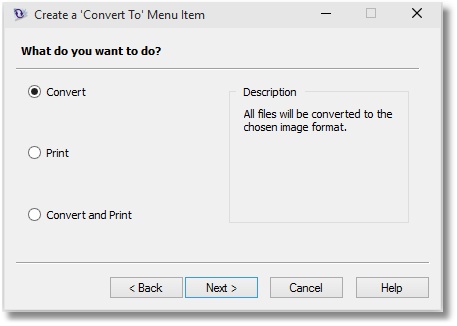
Convert documents into image files and send them to your office printer with the same mouse click, simplifying your workflow process and saving you time. |
Many Common Output Types |
Create non-searchable Adobe PDF files as well as TIFF, JPEG, and many other common image file formats. |
With File Conversion Center you can convert any of the input formats below to any one of the supported output formats as listed below. As well, any of the supported input formats can be printed directly to any number of printers.
| Supported Input Formats | Supported Output Formats |
|
Microsoft Word files (*.doc, *.rtf, *.txt, *.wri, *.log) Microsoft Excel files (*.xls, *.xlw, *.xlc) Microsoft PowerPoint files (*.ppt, *.pps) HTML files (*.htm, *.html, *.shtm, *.shtml) Adobe PDF files (*.pdf) PostScript files (*.ps) web addresses (http://www.webpage.com) JPEG image files (*.jpg) TIFF image files (*.tif) Windows Bitmap image files (*.bmp) ZSoft PCX image files (*.pcx) ZSoft DCX image files (*.dcx) CServe Portable Network Graphics (*.png) Graphics Interchange Format (*.gif) |
non-searchable Adobe PDF files (*.pdf) JPEG image files (*.jpg) TIFF image files (*.tif) Windows Bitmap image files (*.bmp) ZSoft PCX image files (*.pcx) ZSoft DCX image files (*.dcx) CServe Portable Network Graphics (*.png) Graphics Interchange Format (*.gif) |
File Conversion Center does not limit what types of files it will try to convert; the file extension and the operating system’s file associations are used to determine what application to use, if one is needed, when converting each file, and if it is one that File Conversion Center supports. New input file types are added dynamically as they are encountered.
File Conversion Center requires that certain applications be installed on your system to handle some of the associated file conversions.
The table below lists the applications needed and the most common types of files handled by each application. Any file type that can be opened and printed by these applications can be converted
| Application | Input File Type |
| Microsoft Office 2000 - 2007 |
|
| Internet Explorer 5.0 - 7.0 Internet Explorer 8.0 Ready |
|
|
|
|
|
| Built-in (no additional applications required) |
|
We pride ourselves on providing the best support and the fastest response time in the industry, generally responding on average within 2 hours. Please submit the support request form or email your issues to support@peernet.com or call us at 1-800-883-7980 or 613-224-6894 to speak to a support representative directly.
PEERNET technical personnel are available to answer your questions from 09h00 to 17h00, Monday through Friday, Eastern Standard Time (excluding statutory holidays).
Free unlimited support is provided for the full evaluation period and 60 (sixty) days from the date of purchase. For a minimal extra fee On-Going Support (OGS) can optionally be bought at the time of purchase. OGS provides unlimited telephone and email support as well as automatic access to all minor and major releases including upgrades for the term of the agreement. The terms of your OGS contract is found on your purchase confirmation.
If you are Registered User, please include your serial number in any support request, this will facilitates the support process.
How do I find my serial number?
Frequently Asked Questions
|
Updates
|
Download the latest update from the link below.
http://www.peernet.com/download/PNFCCSetup.php
File Conversion Center 4.0.004 - March, 2009
The installation of an update will not affect your existing license.
| Windows 7 - Ready | ![]() |
![]() |
| Windows 2008 R2 - Ready | ![]() |
![]() |
| Windows 2008 | ![]() |
![]() |
| Windows Vista (up to SP1) | ![]() |
![]() |
| Windows 2003 (SP2) | ![]() |
![]() |
| Windows 2003 (up to SP1) | ![]() |
![]() |
| Windows XP (SP3) | ![]() |
![]() |
| Windows XP (up to SP2) | ![]() |
![]() |
| Windows 2000 | ![]() |
![]() |
| Windows NT (up to SP6) | ![]() |
![]() |
| Windows 95/98/ME | ![]() |
![]() |
| Adobe Acrobat and Acrobat Reader | ||
| Microsoft Office | ||
| Internet Explorer | ||
| GhostScript | ||
The File Conversion Center 4.0 is the upgrade path for File Conversion Center 3.0 and 2.0.
As a registered owner of an earlier version you can purchase the latest version at a discounted price. To upgrade please sign into your account, PEERNET Store, if you don’t have an account (new since summer 2006) you will be required to set up a new account and register your existing product serial number or select "View the products I have registered or purchased" in order to be presented with the option to upgrade your existing product.
When your upgrade has been completed you will receive a new serial number and link to download the new version.
To view history details on Version 3.0 & 2.0 click here.
Update File Conversion Center 4.0.004 - March, 2009
Added or Fixed:
Update File Conversion Center 4.0.003 - February, 2008
Resolved issue when Microsoft .NET 3.0 framework is installed on Windows XP and Windows 2000 operating systems prior to installing the File Conversion Center. Installing the File Conversion Center after .NET 3.0 framework caused XPS Printer to stop working.
Fixed random error message "The parameter is incorrect" when setting job properties though the Job Properties Wizard.
Changed Word document conversion to now disable the running of macros when a document is opened.
Fixed error in the advanced interface where dragging a folder from the tree view into the job list was not correctly updating the Selection Filter list.
Update File Conversion Center 4.0.002 - November, 2007
Fixed issues with Adobe 8.0, 8.1 and 8.1.1 compatibility regarding window focus and file limitations.
Released File Conversion Center 4.0 - November, 2007
NEW! File Conversion Center now handles files dynamically by their file type (based on their extension). As new file types that can be opened and printed by one of the supporting applications are encountered, they are added to the list. This is different from previous versions where File Conversion Center could only convert a subset of file types.
Added support for Adobe Reader 8 and Adobe Acrobat 8.
Added support for GhostScript up to version 8.60
Files added in the advanced batch interface are now processed in the order in which they appear in the list.
Fixed problem where very large jobs (10,000 files or more) would take a very long time to initialize before starting to convert.
|
File Conversion Center now runs under Windows Vista and on 64-bit operating systems.
File Conversion Center fully supports Windows Office 2007.
File Conversion Center fully supports Internet Explorer 7 including the new protected mode feature under Windows Vista.
|
|||||||||||||||||||||
|
For organizations with a large number of users, or running Citrix Servers or Terminal Servers, we highly recommend a Site or Enterprise license be purchased in order to eliminate individual activations. Please submit a price request and a PEERNET Sales Representative will contact you with a pricing proposal. Site Edition Permits the activation of an unlimited number of users on computers that are physically situated at a single address (site). Enterprise Edition Permits the activation of an unlimited number of users on computers throughout one (1) Enterprise regardless of the number of users and/or site locations. |
Upgrades and Support
All purchases currently include Free unlimited support for 60 (sixty) days from the date of sale. For a minimal extra fee On-Going Support (OGS) can optionally be bought at the time of purchase. OGS provides unlimited telephone and email support as well as automatic access to all minor and major releases including upgrades for the term of the agreement. The terms of your OGS contract is found on your purchase confirmation.
As a registered owner of an earlier version you can purchase the latest version at a discounted price. To upgrade please sign into your account, PEERNET Store, if you don’t have an account (new since summer 2006) you will be required to set up a new account and register your existing product serial number or select "View the products I have registered or purchased" in order to be presented with the option to upgrade your existing product.
When your upgrade has been completed you will receive a new serial number and link to download the new version.
File Conversion Center 4.0 evaluation version operates for 30 days on all supported platforms. All features are fully functional with the exception that all outputs are stamped with the phrase "Evaluation Copy".
To remove the Evaluation Copy stamp, you must purchase the product.
Press the Start Download button below to start your download.
When installed the Quick Start Guide for File Conversion Center will appear on your desktop. Just open it to get started quickly.