
• Contact
  • Company
  • Login / My Account
  • Shopping Cart (0)
Document Conversion Made Easy!
Peernet Menu
  • Products
      • Virtual Printers
        • tiff-image-printer-iconTIFF Image Printer – Create TIFF Images
        • raster-image-printer-iconRaster Image Printer – Create TIFF, PDF, JPEG, etc.
        • pdf-image-printer-iconPDF Image Printer – Create Searchable PDF
      • PDF Editor
        • pdf-creator-plus-iconPDF Creator Plus – Merge, Edit, Create Searchable PDF
      • Batch Converters
        • document-conversion-service-iconDocument Conversion Service – Unattended 24/7 Batch Converter
        • file-conversion-center-iconFile Conversion Center – Desktop Batch Converter
      • Reporting Software
        • peernet-reports-iconPEERNET Reports – Barcode, Report and Label Software
      • enterprise-licensingEnterprise Licensing for your Corporation
      • discounts-multiple-licensesDiscounts for Purchasing Multiple Licenses
      • distribute-bundle-peernet-softwareDistribute PEERNET Software Bundled with your Product
  • Purchase
      • Purchase Virtual Printers
        • tiff-image-printer-iconTIFF Image Printer – Create TIFF Images
        • raster-image-printer-iconRaster Image Printer – Create TIFF, PDF, JPEG etc.
        • pdf-image-printer-iconPDF Image Printer – Create Searchable PDF
      • Purchase PDF Editor
        • pdf-creator-plus-iconPDF Creator Plus – Merge, Edit, Create Searchable PDF
      • Purchase Batch Converters
        • document-conversion-service-iconDocument Conversion Service – Unattended 24/7 Batch Converter
        • file-conversion-center-iconFile Conversion Center – Desktop Batch Converter
      • Purchase Reporting Software
        • peernet-reports-iconPEERNET Reports – Barcode, Report and Label Software
      • peernet-online-store-purchase-optionsPurchase Options
      • peernet-software-license-levelsLicense Levels
      • peernet-software-purchase-resellerFind Resellers
      • peernet-software-sales-faqsSales FAQ
  • Learn & Support
        • peernet-help-centerTutorials
          • Learn the Basics or Go Beyond with Video Tutorials, FAQs and Guides

            At PEERNET we pride ourselves on providing the best support and the fastest response times in the industry.
          • Select Software Tutorials:
              • tiff-image-printer-iconTIFF Image Printer
              • raster-image-printer-iconRaster Image Printer
              • pdf-image-printer-iconPDF Image Printer
              • pdf-creator-plus-iconPDF Creator Plus
              • document-conversion-service-iconDocument Conversion Service
              • file-conversion-center-iconFile Conversion Center
              • peernet-reports-iconPEERNET Reports
        • peernet-software-faqsSales FAQ
          • Popular Topics

            Find all the answers you need to our most frequently asked questions.
              • Download & Install
                • How do I download software I already purchased?
              • Purchasing & Renewing
                • How do I purchase PEERNET software?
                • What license level do I need?
                • How do I add licenses to an existing serial number?
                • How do I renew my annual subscription?
              • Licensing & Operating
                • How do I activate my new PEERNET software?
                • How do I activate my software without an internet connection?
                • Where do I find my serial number?
                • How do I move my software to a new computer?
                • How do I update/upgrade my software to the latest release?
            • Read all Sales FAQs
  • Blog
  • Menu Menu

Using ZIP Files

October 11, 2022/by Robert Massart

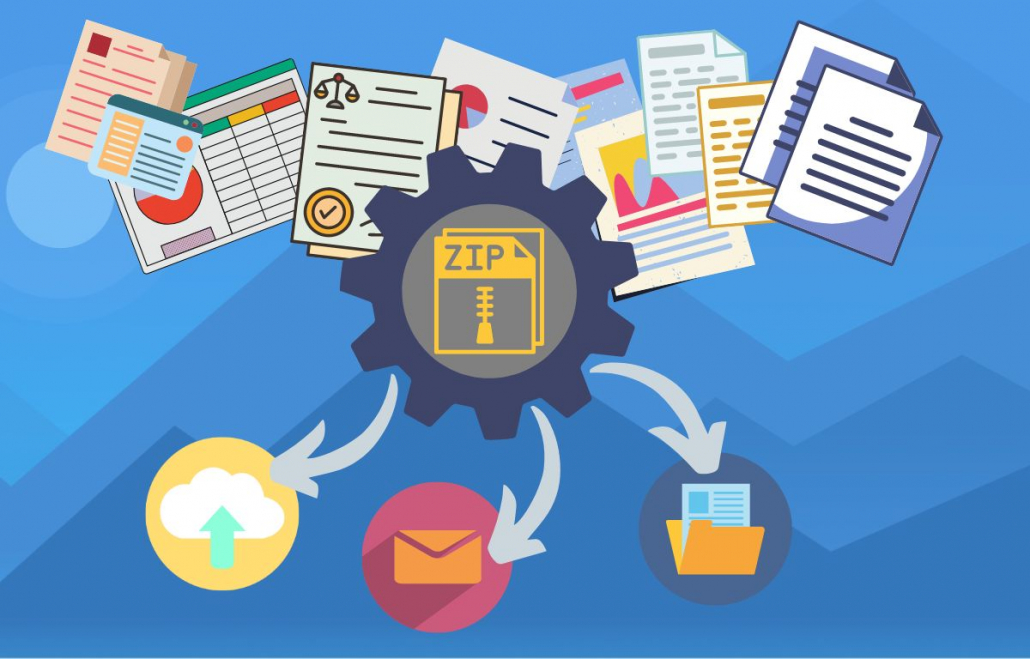
In our digital world of seemingly endless storage space on phones, multi-terabyte hard drives and available cloud storage, file compression still plays an important part in organizing and storing our digital information. Using file archives such as ZIP files to group and compress other files can help reduce our digital clutter and make information easier to find. A single ZIP file is easier to email or share as well as often reducing our storage space use.
Using ZIP Files

What is a ZIP File

Before you begin using ZIP files let’s explain what they are. You can think of these files like a folder on your computer. On your computer you can have one or more files in a folder as well as other folders (subfolders) containing yet more files and folders. A ZIP file is like this folder. It contains all of the files and subfolders and is seen as a single file. They also compress the files contained within, saving storage space compared to a folder of files.

A ZIP file stores the files using a lossless compression algorithm to encode the information by removing redundant data. This keeps the original data and quality while making the overall file size smaller.

Some files formats such as JPG images and MP3 music files are already compressed. Adding these files to a ZIP will not reduce their file size but does give you the advantage of storing multiple files as a single file.

Creating and Opening ZIP Files

You can identify a ZIP file by its .ZIP or .zip file extension. The icon for the file usually includes a zipper. Windows and Mac users can open and create these types of files without having to install extra software. Actions to create and extract these files are part of the file system.

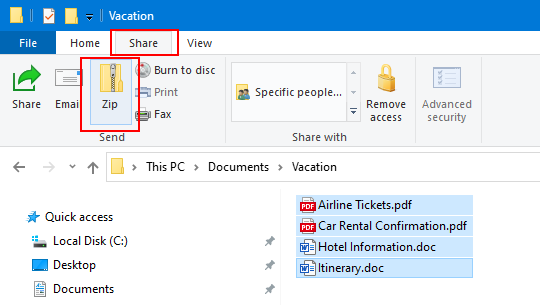
On Windows creating it is as simple as selecting the desired files, or folder, and choosing the Zip action from the Share tab.
create zip files in Windows

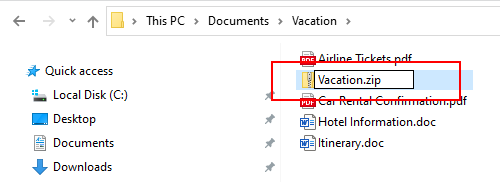
The ZIP is created in the same location with the option to rename the file.
edit the name of the zip file

Extracting the contents of these files is just as simple. Selecting the file will show the Extract tab with tools for compressed folders. Use the Extract all action to pull out a copy of the contents out of the file and copy the files on to your computer. This action leaves the file archive untouched.
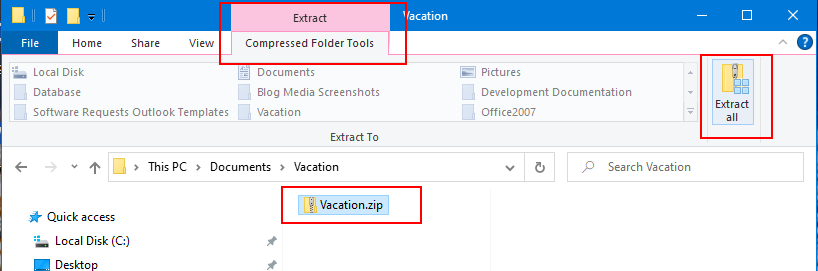
extract zip file on Windows

Other ZIP Software

There are both free and commercial programs available that create .zip, .7z, .tar and other file archive formats. Popular choices include 7-Zip, WinZip, PeaZip and Stuffit. These programs have additional features such as password protection and enhanced compression and encryption options. These benefits come at the expense of needing the software installed to open the archived files.

Choosing a ZIP Compression Format

The three most common types of compressed file archives are ZIP, 7z and TAR. Raster Image Printer, TIFF Image Printer and PDF Image Printer can automatically bundle the created files into one of these three types of file archives. Which compression format you choose depends on if you are looking for security and encryption, a high compression ratio or need accessibility across platforms.

The ability to create and extract ZIP archives is part of both the Windows and Mac operating systems. It can easily be added to Linux and Unix distributions. If you choose to create a ZIP archive you can be certain that the recipient of the file will be able to open it.

For maximum data compression and security options, create a 7z compressed file. 7z offers a higher compression ratio, password protection and AES-256 encryption. These extra features make 7z a popular choice for both its reliability and file integrity.

TAR archives originated on Unix systems but can be used on Windows and Mac as well. A TAR archive compresses all of the files together as a whole, not individually like ZIP and 7z. Accessing any file in the archive means decompressing, or extracting the entire archive.

Advantages of Creating ZIP Files

Email

Email providers usually have a size limit when attaching files. When sending large files you often need to compress them first. If you need to email multiple files, it is easier for you and the recipient if you can email a singe file. Bundling multiple files into a single ZIP file also creates a smaller file for emailing. Smaller files also upload and download faster.

Sharing in the Cloud

For similar reasons as when sending email, uploading files to an internal file share, Google Workspace, OneDrive or Dropbox is more efficient if we compress the files to a single file of smaller size first. It is easier for co-workers to access a singe file and also helps save on your cloud storage use.

Save Space and Reduce Clutter

Even though large hard drives are now fairly cheap, it is still good practice to free up drive space by zipping files that we don’t use often. Grouping various files and folders into a single file reduces file clutter and makes it easier to find, store and backup your data.

https://www.peernet.com/wp-content/uploads/Using-ZIP-Files-Feature.jpg 800 800 Robert Massart https://www.peernet.com/wp-content/uploads/peernet-logo.png Robert Massart2022-10-11 12:10:102022-11-02 12:11:22Using ZIP Files
  • Document Conversion Service
  • TIFF Image Printer
  • Raster Image Printer
  • PDF Image Printer
  • PDF Creator Plus
  • File Conversion Center
  • PEERNET Reports
Search Search

Recent Posts

  • PNSrv11Lib to PNSrv12Lib: Migration Made Easy
  • Migrating to Version 12: Compatibility Mode Quick Start Guide
  • Well Logs: Stitch PDF Pages into a Continuous TIFF Image
  • Dynamic Stamp Content
  • Convert to PDF: The Power of On-Premise PDF Creation

INTERESTING LINKS

Below are some interesting links for you! Enjoy your stay :)

RSS Feed Logo RSS Feed Logo Subscribeto RSS Feed

OUR PRODUCTS

  • Document Conversion Service
  • TIFF Image Printer
  • Raster Image Printer
  • PDF Image Printer
  • PDF Creator Plus
  • File Conversion Center
  • PEERNET Reports

LATEST NEWS

  • PNSrv11Lib to PNSrv12Lib: Migration Made EasyMarch 14, 2025 - 2:10 pm
  • Migrating to Version 12: Compatibility Mode Quick Start GuideMarch 14, 2025 - 2:09 pm
  • Well Logs: Stitch PDF Pages into a Continuous TIFF ImageMarch 14, 2025 - 2:08 pm
  • Dynamic Stamp ContentNovember 4, 2024 - 4:47 pm

BUSINESS INFORMATION

Toll Free: 1-800-883-7980 North America

Tel: 1-613-224-6894

Our office hours are Monday to Friday, from 0900 hrs to 1700 hrs, Eastern Standard Time.

Email Address: [email protected]
Copyright © 1997-2026. All rights reserved. Terms and Conditions | Disclaimer | Privacy Policy | Trademarks.
PEERNET® is a registered trademark of PEERNET Inc.
  • Link to Youtube
  • Link to Rss this site
  • Products
  • Purchase
  • Company
  • Contact
Link to: Remove and Replace Text in the Print Job File Name Link to: Remove and Replace Text in the Print Job File Name Remove and Replace Text in the Print Job File Nameremove-or-replace-text-in-print-job-file-name Link to: Combine Files Into a PDF File Link to: Combine Files Into a PDF File pdf-raster-imagerprinter-feature-imageCombine Files Into a PDF File
Scroll to top Scroll to top Scroll to top