



PEERNET Reports is a barcode, reporting and labeling solutions designed to deliver the highest performance, greatest flexibility, and tightest integration possible in the market. It is ideal for any size of company, or for an individual delivering real-time information while leveraging their existing technology and infrastructure.
PEERNET Reports is an embeddable Java reporting, labeling, and bar code solution. It comes bundles with our free to use PEERNET Reports Designer desktop application.
With exclusive support for bar coding built-in, PEERNET's barcode, reporting and labeling solutions play a pivotal role in ERP, quotation, ticketing, warehousing, shipping, stores, manufacturing, identification, banking, postal systems or any other system where bar codes are critical to your success.
PEERNET Reports is not a report server like some other reporting solutions. Although it comes with a web application that can be used out of the box to deploy and execute reports or labels, it is primarily deployed embed and tightly integrated with your own web or desktop application by simply adding two jars to your Java classpath or into your web application's web-inf/lib folder. Its just that simple.
- Tomcat
- JBoss
- BEA WebLogic
- IBM WebSphere
- Macromedia JRun
- Macromedia Cold Fusion
- Sun Java System Web Server
- Sun ONE Web Server
The reporting engine has also been tested on the following platforms:
- Microsoft Windows
- Linux (Red Hat and SuSe)
- Solaris (SPARC and Intel)
- IBM AS400
- IBM iSeries
You can deploy this reporting engine to any Java 2 version 1.3 or higher platform. It is recommended that you use version 1.4 or higher do to font limitation in version 1.3.
Using Java 2 version 1.4 or higher in headless mode eliminates the requirement for either the IBM Native AWT Toolkit or XVFB on your computer.
If you choose to use Java version 1.3 or to no run headless mode on IBM AS400, IBM iSeries, Solaris, Linux, or any other UNIX environment, you will be required to install either the IBM Native AWT Toolkit or XVFB on your computer.
See the PEERNET Reports Embedded User Guide for complete details and an example of embedding a reporting solution.
Fonts
In order to have a true WYSIWYG environment across all possible platforms, PEERNET Reports reporting engine uses
a fonts folder to control the available fonts for reports and labels creation. To add a font, you just place your Windows TrueType
font file in the font folder.
Why only Windows TrueType files? PEERNET Reports reporting engine can only support the fonts loadable by the Sun’s Java 2 platform and this is currently limited to Windows TrueType files.
Report Design
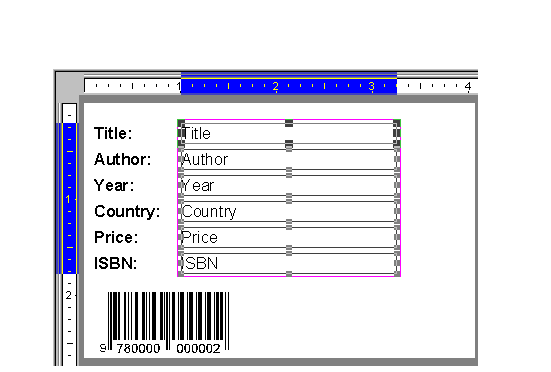
All reports, labels and requests used by the PEERNET Reports are developed and tested with PEERNET Reports Designer desktop application.
PEERNET Reports Designer provides a complete WYSIWYG environment that allows full access to all the objects used to construct a reporting
or labeling solution. It can build virtually any style of report or label. It comes with an extensive collection of components Text,
Rich-Text, Logo, Line, Shape, and Barcode that are fully customizable. And better yet, its a free desktop application for you to use even
if you do not embed the PEERNET Reports into your own Java solution.
Please refer to the following guides to assist you as well.
If you cannot locate an answer to your questions please don't hesitate to email your issues to support@peernet.com or call us at 1-800-883-7980 or 613-224-6894 to speak to a support representative directly.
Create a Basic Report - Tutorial (PDF) - to use this tutorial, you must also download the accompanying sample project, which is found below.
Create a Basic Report - Sample Project - accompanies the above tutorial, and includes a sample project file and sample database files.
Create a Basic Label - Tutorial (PDF) - to use this tutorial, you must also download the accompanying sample project, which is found below.
Create a Basic Label - Sample Project - accompanies the above tutorial, and includes a sample project file and sample database files.
Northwind Database - Sample Project - contains pre-designed reports similar to those in the Microsoft Access sample database Northwind.
SAS Database - Sample Project - contains pre-designed reports similar to those in the SAS sample database Annual Report.
Industry Standard Labels - Sample Project - contains pre-designed, industry-standard label templates which are connected to sample data. You can use or modify these templates as required for your projects. Templates include those for UPS international and domestic shipping, Serial Shipping Container Code (SSCC), Automotive Industry Action Group (AIAG), Wal-Mart, SEARS, LL Bean, JC Penny, General Motors, the U.S. Department of Defense, UPC, EAN, ISBN, nutrition information, video tape inventory, identification card, and standard address formats.
Download Instructions
The tutorials below are in PDF format. Click the link of a specific tutorial to view it in your web browser. Note that the Adobe Acrobat Reader is required to be installed on your system to view tutorials in PDF format.
The sample projects and their accompanying files are contained in a single ZIP file. Note that you need WinZip or a similar application to be installed on your system to extract these files. To download and install sample projects, follow these steps:
Projects downloaded into the examples folder will become available for selection in the dialog box that opens when you launch the PEERNET Reports Designer application.
| Sales Report 1 (PDF) | Sales Report 2 (PDF) | Cross-Tab Report (PDF) |
![]() |
![]() |
![]() |
| Catalog Report (PDF) | Invoice Report (PDF) | Banking Statement (PDF) |
![]() |
![]() |
|
| Inventory Report 1 (PDF) | Inventory Report 2 (PDF) | |
![]() |
Support is provided to all customers with a valid On-Going Support contract. Please note, when an On-Going Support contract is purchased for PEERNET Reports Designer, PEERNET technical personnel will not be able to answer any of your embedded reporting engine questions and can only answer questions about PEERNET Reports Designer, you are required to have a PEERNET Reports On-Going Support contract.
We pride ourselves on providing the best support and the fastest response time in the industry, generally responding on average within 2 hours. Please submit the support request form or email your issues to support@peernet.com or call us at 1-800-883-7980 or 613-224-6894 to speak to a support representative directly.
PEERNET technical personnel are available to answer your questions from 09h00 to 17h00, Monday through Friday, Eastern Standard Time (excluding statutory holidays).
A valid On-Going Support contract number is required in order to get any questions answered.
PEERNET Reports is licensed on a per software solution basis. A royalty free distribution license is required in order to distribute PEERNET Reports as part of your solution. The distribution license is for only one (1) named solution. This distribution license is not available online. Please email PEERNET Sales at peernet@peernet.com or call 1-800-883-7980 to discuss your purchase.
PEERNET Reports Designer is free to use and is included as part of PEERNET Reports. However, we can not provide support for this component for free. If you need support on PEERNET Reports Designer, then you need to purchase an On-Going support contract.
PEERNET Reports is licensed on a per software solution basis. A royalty free distribution license is required in order to distribute PEERNET Reports as part of your solution. The distribution license is for only one (1) named solution. This distribution license is not available online. Please email PEERNET Sales at peernet@peernet.com or call 1-800-883-7980 to discuss your purchase.
You can use PEERNET Reports in your software solution but be aware all outputs are watermarked and this watermark can only be removed by purchasing a distribution license.
PEERNET Reports Designer is part of PEERNET Reports. These installers will install PEERNET Reports 2.6. You will be able to use PEERNET Reports Designer for free. We only charge for support on PEERNET Reports Designer.
Available Installers
Platform
![]()
![]()
![]()
![]()
![]()
![]()
![]()
Instructions
PNRPTSJ2.exe
Notes
Instructions
PNRPTSJ2
Notes
Instructions
cd to the directory where you downloaded the installer.
sh ./PNRPTSJ2.bin
Notes
Instructions
cd to the directory where you downloaded the installer.
sh ./PNRPTSJ2.bin
Notes
Instructions
cd to the directory where you downloaded the installer.
sh ./PNRPTSJ2.bin
Notes
Instructions
cd to the directory where you downloaded the installer.
sh ./PNRPTSJ2.bin
Notes
Instructions (Unix or Unix-like operating systems)
java -jar PNRPTSJ2.jar
jre -cp PNRPTSJ2.jar install
java -classpath [path to]classes.zip:PNRPTSJ2.jar install
cd [to directory where PNRPTSJ2.jar is located] CLASSPATH=PNRPTSJ2.jar export CLASSPATH java install
cd [to directory where PNRPTSJ2.jar is located] setenv CLASSPATH PNRPTSJ2.jar java install
Instructions (for other platforms)
PNRPTSJ2.jar to before running the installer
PNRPTSJ2.jar to your CLASSPATH, then start the main class of the installer named install