
• Contact
  • Company
  • Login / My Account
  • Shopping Cart (0)
Document Conversion Made Easy!
Peernet Menu
  • Products
      • Virtual Printers
        • tiff-image-printer-iconTIFF Image Printer – Create TIFF Images
        • raster-image-printer-iconRaster Image Printer – Create TIFF, PDF, JPEG, etc.
        • pdf-image-printer-iconPDF Image Printer – Create Searchable PDF
      • PDF Editor
        • pdf-creator-plus-iconPDF Creator Plus – Merge, Edit, Create Searchable PDF
      • Batch Converters
        • document-conversion-service-iconDocument Conversion Service – Unattended 24/7 Batch Converter
        • file-conversion-center-iconFile Conversion Center – Desktop Batch Converter
      • Reporting Software
        • peernet-reports-iconPEERNET Reports – Barcode, Report and Label Software
      • enterprise-licensingEnterprise Licensing for your Corporation
      • discounts-multiple-licensesDiscounts for Purchasing Multiple Licenses
      • distribute-bundle-peernet-softwareDistribute PEERNET Software Bundled with your Product
  • Purchase
      • Purchase Virtual Printers
        • tiff-image-printer-iconTIFF Image Printer – Create TIFF Images
        • raster-image-printer-iconRaster Image Printer – Create TIFF, PDF, JPEG etc.
        • pdf-image-printer-iconPDF Image Printer – Create Searchable PDF
      • Purchase PDF Editor
        • pdf-creator-plus-iconPDF Creator Plus – Merge, Edit, Create Searchable PDF
      • Purchase Batch Converters
        • document-conversion-service-iconDocument Conversion Service – Unattended 24/7 Batch Converter
        • file-conversion-center-iconFile Conversion Center – Desktop Batch Converter
      • Purchase Reporting Software
        • peernet-reports-iconPEERNET Reports – Barcode, Report and Label Software
      • peernet-online-store-purchase-optionsPurchase Options
      • peernet-software-license-levelsLicense Levels
      • peernet-software-purchase-resellerFind Resellers
      • peernet-software-sales-faqsSales FAQ
  • Learn & Support
        • peernet-help-centerTutorials
          • Learn the Basics or Go Beyond with Video Tutorials, FAQs and Guides

            At PEERNET we pride ourselves on providing the best support and the fastest response times in the industry.
          • Select Software Tutorials:
              • tiff-image-printer-iconTIFF Image Printer
              • raster-image-printer-iconRaster Image Printer
              • pdf-image-printer-iconPDF Image Printer
              • pdf-creator-plus-iconPDF Creator Plus
              • document-conversion-service-iconDocument Conversion Service
              • file-conversion-center-iconFile Conversion Center
              • peernet-reports-iconPEERNET Reports
        • peernet-software-faqsSales FAQ
          • Popular Topics

            Find all the answers you need to our most frequently asked questions.
              • Download & Install
                • How do I download software I already purchased?
              • Purchasing & Renewing
                • How do I purchase PEERNET software?
                • What license level do I need?
                • How do I add licenses to an existing serial number?
                • How do I renew my annual subscription?
              • Licensing & Operating
                • How do I activate my new PEERNET software?
                • How do I activate my software without an internet connection?
                • Where do I find my serial number?
                • How do I move my software to a new computer?
                • How do I update/upgrade my software to the latest release?
            • Read all Sales FAQs
  • Blog
  • Menu Menu
document converter features

Why Microsoft Word is Not Ideal for Sharing Docs at the Office

June 12, 2014/by Robert Massart

While Microsoft Word is a widely-used and fairly powerful program for a variety of desktop publishing applications, it is not ideal for sharing documents with your coworkers in the office or clients. Here are a few reasons why:

Formatting Changes from one Computer to Another

Imagine this scenario: you have a lengthy document, and have spent hours formatting it just perfectly. You’ve adjusted margins, used a variety of special fonts you downloaded, and set the page breaks so that they’re logical within the flow of the document. Everything looks perfect, so finally, you send it off to the client.

The client receives it and is not impressed at all. Though you haven’t made errors, in some places there are no spaces where there are supposed to be. You used a font that the client doesn’t have installed on their computer so their version of Word substitutes a different one in, altering the layout of the document. The client has different margins set by default, and when they go to print off the document, the page breaks make no sense.

Unfortunately, this scenario actually happens all the time. These sorts of things can ruin the impression you make on current or potential clients. Your client may never mention to you that some things on the document looked sloppy or strange, and instead, just assume that you were careless, not knowledgeable, or not diligent enough to check over your work. There are workarounds, but they require a good deal of knowledge about Word (or at least a good deal of searching around online.)

Compatibility with Other Word Processors

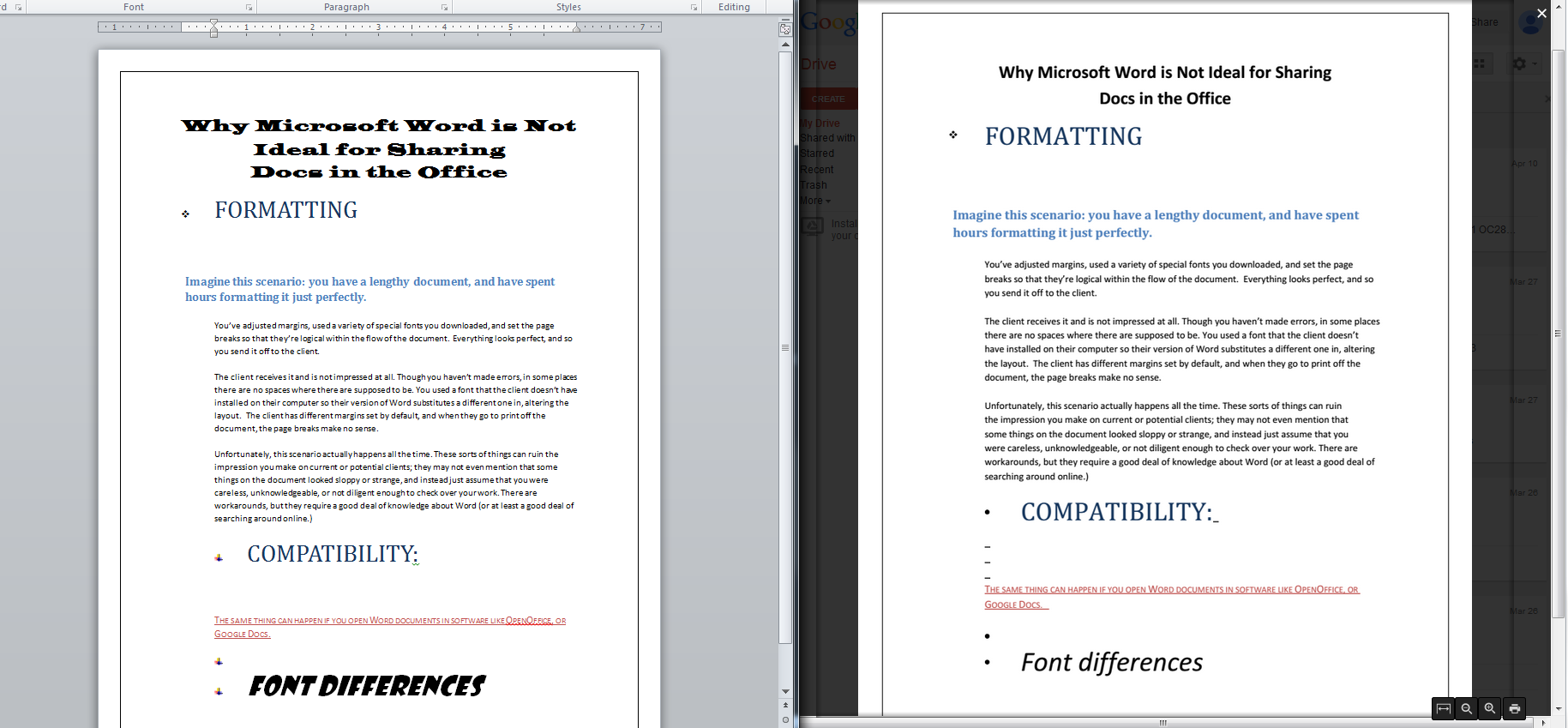
The same sorts of things can happen if your client or colleague opens Word documents in alternative Word Processing software, like OpenOffice, or Google Docs. Have a look at this side-by-side comparison of the same document in Word and Google Docs, and notice some of the issues that can occur.
word-vs-google-comparison
  • You can’t be sure that Google Docs will recognize or render fonts in the same way;
  • Google Docs is unable to render the custom bullet points used on the lower half of the page;
  • Google Docs inserts dashes below the second heading, where none are visible on the Word document.

These are just a few examples of how things can go wrong from one program to another.

Security

Microsoft Office products are notoriously vulnerable to hackers and malicious activity. As recently as last year, a major vulnerability was discovered that allowed hackers the same computer privileges as the users that they infected.

Whatever industry you work in, you likely have some sort of sensitive information stored on your work computers. It’s bad enough if one machine is infected, but passing an infected file around the office could have devastating consequences and lead to a breach of information.

Solutions

For maintaining your formatting…

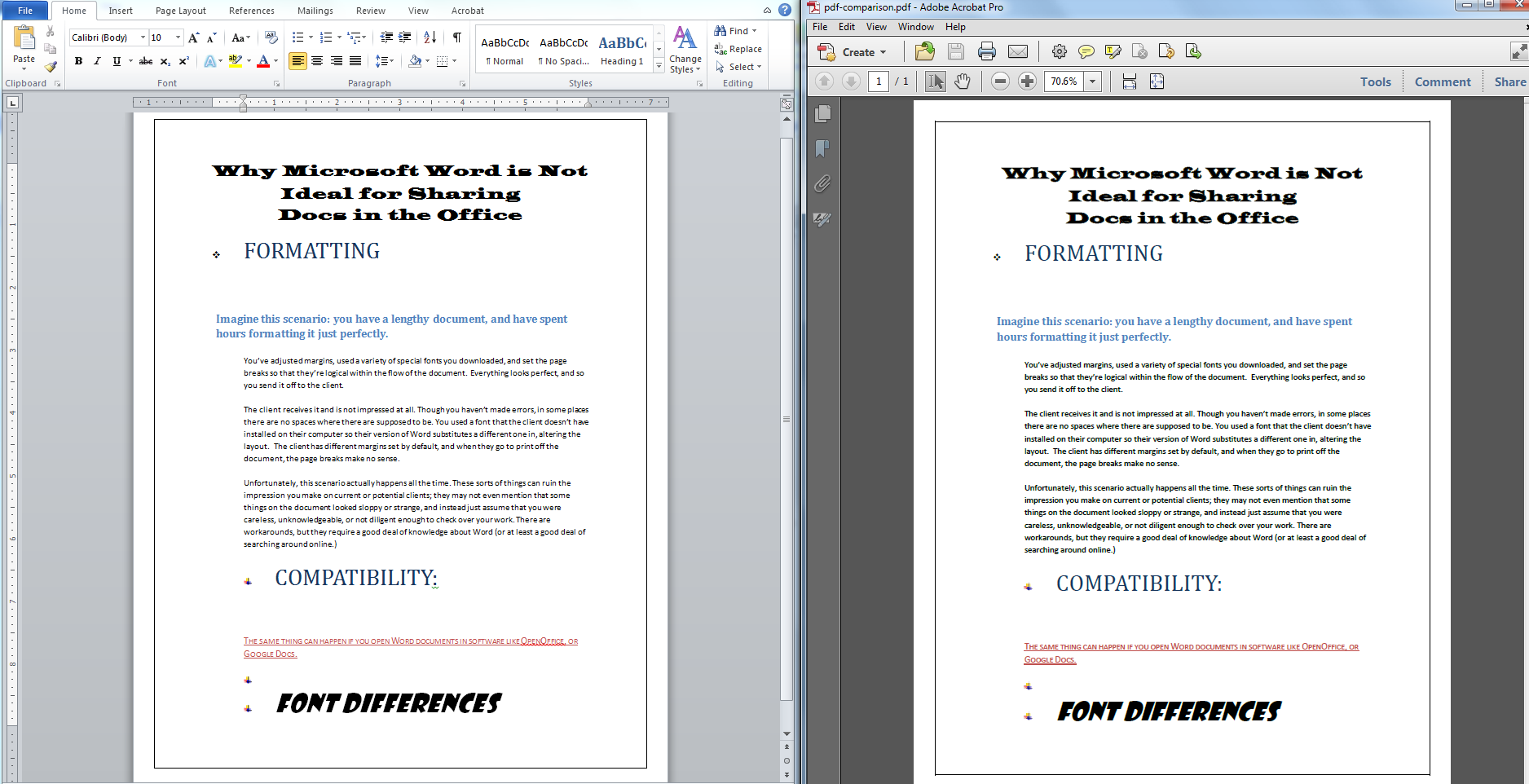
PORTABLE DOCUMENT FORMAT (PDF): PDFs are a great way to maintain document layout, and is a quick and easy way to ensure that your formatting, margins and layout remains intact. When you print to PDF, with a product like PEERNET’s PDF Image Printer, you can rest easy knowing that the recipient of the document will receive the document as intended. Check out the comparison below of our Word document (left) and the PDF version of it (right) — they’re basically identical.
word-vs-pdf-comparison

For maintaining your formatting and network security…

TIFF: TIFF is an image format, similar to something like a JPEG. The difference is that TIFFs, unlike JPEGs, GIFs, PNGs, or other image formats, are what’s called a loss-less format. While that makes them a bit bigger in terms of file size than other image formats, it ensures the highest-quality output. The other big feature of TIFFs is that it can never have a virus embedded with it, making it the best choice in terms of network security. Check out our TIFF Image Printer program to get your business started on the path to safe, loss-less document sharing… and never worry about messed-up formatting again!

https://www.peernet.com/wp-content/uploads/office-collaboration.jpg 1000 1000 Robert Massart https://www.peernet.com/wp-content/uploads/peernet-logo.png Robert Massart2014-06-12 15:19:542019-07-16 14:45:24Why Microsoft Word is Not Ideal for Sharing Docs at the Office
  • Document Conversion Service
  • TIFF Image Printer
  • Raster Image Printer
  • PDF Image Printer
  • PDF Creator Plus
  • File Conversion Center
  • PEERNET Reports
Search Search

Recent Posts

  • PNSrv11Lib to PNSrv12Lib: Migration Made Easy
  • Migrating to Version 12: Compatibility Mode Quick Start Guide
  • Well Logs: Stitch PDF Pages into a Continuous TIFF Image
  • Dynamic Stamp Content
  • Convert to PDF: The Power of On-Premise PDF Creation

INTERESTING LINKS

Below are some interesting links for you! Enjoy your stay :)

RSS Feed Logo RSS Feed Logo Subscribeto RSS Feed

OUR PRODUCTS

  • Document Conversion Service
  • TIFF Image Printer
  • Raster Image Printer
  • PDF Image Printer
  • PDF Creator Plus
  • File Conversion Center
  • PEERNET Reports

LATEST NEWS

  • PNSrv11Lib to PNSrv12Lib: Migration Made EasyMarch 14, 2025 - 2:10 pm
  • Migrating to Version 12: Compatibility Mode Quick Start GuideMarch 14, 2025 - 2:09 pm
  • Well Logs: Stitch PDF Pages into a Continuous TIFF ImageMarch 14, 2025 - 2:08 pm
  • Dynamic Stamp ContentNovember 4, 2024 - 4:47 pm

BUSINESS INFORMATION

Toll Free: 1-800-883-7980 North America

Tel: 1-613-224-6894

Our office hours are Monday to Friday, from 0900 hrs to 1700 hrs, Eastern Standard Time.

Email Address: [email protected]
Copyright © 1997-2026. All rights reserved. Terms and Conditions | Disclaimer | Privacy Policy | Trademarks.
PEERNET® is a registered trademark of PEERNET Inc.
  • Link to Youtube
  • Link to Rss this site
  • Products
  • Purchase
  • Company
  • Contact
Link to: Combining Specific Pages of Each File into a Single PDF Link to: Combining Specific Pages of Each File into a Single PDF Combining Specific Pages of Each File into a Single PDFDocument Conversion Service box shot Link to: The Paperless Office: Making Sense of Dollars and Cents Link to: The Paperless Office: Making Sense of Dollars and Cents document digitization at the officeThe Paperless Office: Making Sense of Dollars and Cents
Scroll to top Scroll to top Scroll to top