



PEERNET Reports is a bar code, reporting and labeling solutions designed to deliver the highest performance, greatest flexibility, and tightest integration possible in the market. It is ideal for any size of company, or for an individual delivering real-time information while leveraging their existing technology and infrastructure.
PEERNET Reports Designer is free to use. Just click Design and Print to start producing your own reports or labels for free. If you have a bar code printer from Zebra, Eltron, Datamax, Intermec, or Sato, you can even print to these printers using the built-in support. However, please note that the free version will prompt requesting to be activated when started and any print outs will contain an attribution at the top and bottom of each page. To remove, purchase a PEERNET Reports Designer activation from here.
If you want to experience the full potential of PEERNET Reports, you can download a desktop version from here. It allows you to work with all the features of the product, including access to the PEERNET Reports Runtime Engine for testing purposes in your own Java applications or service.
PEERNET Reports is an embeddable Java reporting, labeling, and bar code solution.
Whether you are just looking to create bar code labels or advanced reports, PEERNET Reports is up to the task. That's why companys like HP, Tyco Electronics, RCMP, Postal Canada, and others use this product on a daily basis.
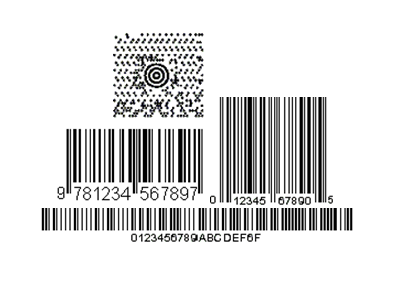
With exclusive support for bar coding built-in, PEERNET's bar code, reporting and labeling solutions play a pivotal role in ERP, quotation, ticketing, warehousing, shipping, stores, manufacturing, identification, banking, postal systems or any other system where bar codes are critical to your success.
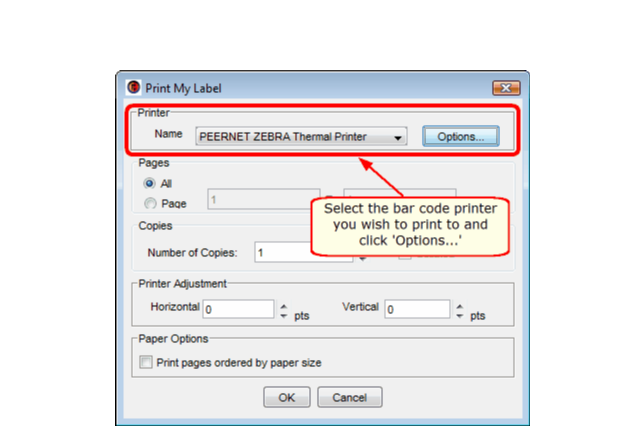
PEERNET Reports includes built-in support for bar code printers from Zebra, Eltron, Datamax, Intermec, and Sato. It also includes RFID support for Zebra and Datamax bar code printers with other manufactures to be added in future releases.
PEERNET Reports is not a report server like some other reporting solutions. Although it comes with a sample web application that can be used out of the box to deploy and execute reports or labels, it is primarily deployed embed and tightly integrated with your own Java webstart, desktop, or J2EE application by simply adding two jars to your Java classpath or into your web application's web-inf/lib folder. Its just that simple.
Visual Bar Code, Report and Label Designer
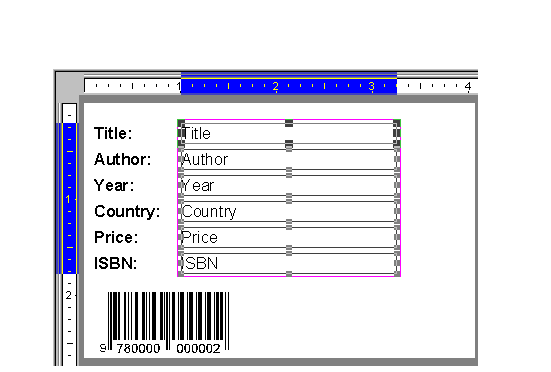
PEERNET Reports Designer provides a complete WYSIWYG environment that allows full access to all the objects used to
construct a barcode, reporting or labeling solution. It can build virtually any style of report or label. It comes with
an extensive collection of components Text, Rich-Text, Logo, Line, Shape, and Barcode that are fully customizable.
Database and Visual Query Builder
PEERNET Reports Designer provides a built-in heterogeneous J-SQL engine and a Visual SQL Query (QBE) builder that
allows you to visually construct the SQL used in a report or label (no need to know SQL). This powerful J-SQL engine allows
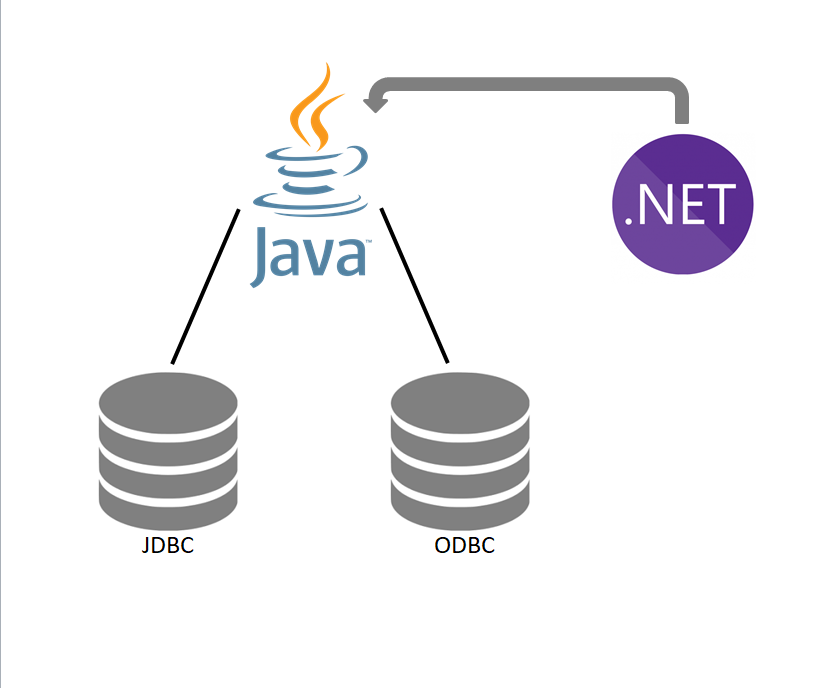
you to access multiple sources of data (JDBC sources, ODBC sources, Java Object sources, etc) all at the same time. This
means you can join data from many different sources (an Excel spread sheet to an Oracle database table for instance) with
no special database programming.
Why do we say J-SQL and not simply SQL. The reason being that the SQL engine is Java aware. This allows any Java Object to be accessed as a Java Object Table. The J-SQL engine is what allows this to happen seamlessly. It provides full access to the Java Objects. You can access any field or method of these Java Objects just like you do in your own Java code.
Advanced Paper Stock Support
PEERNET Reports provides full support for user define Paper Stocks along with the hundreds of Avery®
paper stocks you can import from our Avery paper stock database.
Why? In order to provide a true WYSIWYG environment for constructing reports and labels that meet industry design and layout standards. This is specifically important in the bar code and labeling industries.
This feature enables reports and labels to be sent to a bar code printer or exported to formats like Adobe searchable PDF, or raster image files like JPEG, PNG or Windows BMP in a truly WYSIWYG manner.
Advanced Java Scripting and Expressions
PEERNET Reports script and expression language is the Java language. In other words, PEERNET Reports does not have its own proprietary script and expression
language but instead it uses Java everywhere. This means that if you have written your own Java classes and expressions,
you can directly access them from within PEERNET Reports without having to recode them into a proprietary language.
You can even copy and paste them right into PEERNET Reports.
Powerful Object Model
PEERNET Reports, unlike other reporting solutions provides access to any part of the reporting solution through the
PEERNET Reports Object Model. This model describes the Java API used to alter the reporting solution called
from a request, report or label event method or from your own Java code.
Reuse
PEERNET Reports takes reuse to the extreme. Not only can you parameterize a report or label to create your own report
and label templates but you can also create Requests.
Requests are executable units of work that can do a variety of operations at once. You can think of Requests as macros. Their primary purpose is to reuse a report or label in order to export and/or print the report or label to one or more formats (Adobe PDF, Postscript, EPS, Image, a bar code printer from Zebra, Intermec, Datamax, Eltron or Sato) and/ or one or more printers.
Embeddable
PEERNET Reports makes embedding easy. The same PEERNET Reports Object Model you use inside the PEERNET Reports
Designer is the same one you use when embedding the reporting solution. There is only (1) one additional API that needs
to be learnt in order to embed a reporting solution into your own Java solution.
See the PEERNET Reports User Guide for complete details and an example of embedding a reporting solution.
Web Application Servers and Platforms
This high performance and scaleable reporting engine has been deployed and used on the following J2EE Web Application Servers:
- Tomcat
- JBoss
- BEA WebLogic
- IBM WebSphere
- Macromedia JRun
- Macromedia Cold Fusion
- Sun Java System Web Server
- Sun ONE Web Server
The reporting engine has also been used on the following platforms:
- Microsoft Windows
- Linux (Red Hat and SuSe)
- Solaris (SPARC and Intel)
- IBM AS400
- IBM iSeries
- HP-UX 11i
- Mac OS X
You can deploy this reporting engine to any Java 2 version 1.4 or higher platform.
Using Java 2 version 1.4 or higher in headless mode eliminates the requirement for either the IBM Native AWT Toolkit or XVFB on the target system.
See the PEERNET Reports User Guide for complete details.
Please refer to the following guides to assist you as well.
If you cannot locate an answer to your questions please don't hesitate to email your issues to support@peernet.com or call us at 1-800-883-7980 or 613-224-6894 to speak to a support representative directly.
All sample projects are automatically available from within PEERNET Reports Designer. Any new samples will be automatically updated when you open PEERNET Reports Designer.
To open a sample project, just the open project wizard (File|Open) and select the samples radio button.
The following a tutorials to help you understand how to work with PEERNET Reports in order to create reports and labels:
| Sales Report 1 (PDF) | Sales Report 2 (PDF) | Cross-Tab Report (PDF) |
![]() |
![]() |
![]() |
| Catalog Report (PDF) | Invoice Report (PDF) | Banking Statement (PDF) |
![]() |
![]() |
![]() |
| Inventory Report 1 (PDF) | Inventory Report 2 (PDF) | |
![]() |
![]() |
Support is provided only to customers with a valid On-Going Support contract. PEERNET technical personnel will not be able to answer any of your PEERNET Reports question unless you have a PEERNET Reports On-Going Support contract in place.
We pride ourselves on providing the best support and the fastest response time in the industry, generally responding on average within 2 hours. Please submit your questions by email to support@peernet.com or call us at 1-800-883-7980 or 613-224-6894 to speak to a support representative directly.
PEERNET technical personnel are available to answer your questions from 09h00 to 17h00, Monday through Friday, Eastern Standard Time (excluding statutory holidays).
PEERNET Reports is licensed on a per software solution basis. A distribution or embedding license is required in order to distribute or embed PEERNET Reports as part of your solution. The distribution or embedding license is valid for only one (1) named solution. This distribution or embedding license is not available online. Please email PEERNET Sales at peernet@peernet.com or call us at 1-800-883-7980 or 613-224-6894 to discuss your needs.
PEERNET Reports Designer is free to use. Just click Design and Print to start producing your own reports or labels for free. If you have a bar code printer from Zebra, Eltron, Datamax, Intermec, or Sato, you can even print to these printers using the built-in support. However, please note that the free version will prompt requesting to be activated when started and any print outs will contain an attribution at the top and bottom of each page.
If you need to use PEERNET Reports Designer without any attributions, or you need technical support, you can purchase PEERNET Reports Designer activations on a per seat basis as listed below:
|
|
PEERNET Reports Designer is free to use. Just click Design and Print to start producing your own reports or labels for free. If you have a bar code printer from Zebra, Eltron, Datamax, or Intermec, you can even print to these printers using the built-in support. However, please note that the free version will prompt requesting to be activated when started and any print outs will contain an attribution at the top and bottom of each page.
If you need to use PEERNET Reports without the attributions at the top and bottom of each page, or you need technical support, you can purchase PEERNET Reports activations on a per seat basis from here.
If you want to evaluate the full power of PEERNET Reports, please download one of the following installers, but please be aware all print outs will contain an attribution at the top and bottom of each page and this can only be be removed by purchasing either a PEERNET Reports Designer activation, a distribution or embedding license in order to allow full use of the PEERNET Reports Runime Engine. Please email PEERNET Sales at peernet@peernet.com or call 1-800-883-7980 or 613-224-6894 to discuss your needs.
PEERNET Reports 3.0.053
Available Installers
Platform
![]()
![]()
![]()
![]()
![]()
![]()
![]()
Instructions
PNRPTSJ3.exe
Notes
Instructions
PNRPTSJ3
Notes
Instructions
cd to the directory where you downloaded the installer.
sh ./PNRPTSJ3.bin
Notes
Instructions
cd to the directory where you downloaded the installer.
sh ./PNRPTSJ3.bin
Notes
Instructions
cd to the directory where you downloaded the installer.
sh ./PNRPTSJ3.bin
Notes
Instructions (Unix or Unix-like operating systems)
java -jar PNRPTSJ3.jar
java -classpath [path to]classes.zip:PNRPTSJ3.jar install
cd [to directory where PNRPTSJ3.jar is located] CLASSPATH=PNRPTSJ3.jar export CLASSPATH java install
cd [to directory where PNRPTSJ3.jar is located] setenv CLASSPATH PNRPTSJ3.jar java install
Instructions (for other platforms)
PNRPTSJ3.jar to before running the installer
PNRPTSJ3.jar to your CLASSPATH, then start the main class of the installer named install
|
|||||||
|
|||||||
|
Our Customers