
• Contact
  • Company
  • Login / My Account
  • Shopping Cart (0)
Document Conversion Made Easy!
Peernet Menu
  • Products
      • Virtual Printers
        • tiff-image-printer-iconTIFF Image Printer – Create TIFF Images
        • raster-image-printer-iconRaster Image Printer – Create TIFF, PDF, JPEG, etc.
        • pdf-image-printer-iconPDF Image Printer – Create Searchable PDF
      • PDF Editor
        • pdf-creator-plus-iconPDF Creator Plus – Merge, Edit, Create Searchable PDF
      • Batch Converters
        • document-conversion-service-iconDocument Conversion Service – Unattended 24/7 Batch Converter
        • file-conversion-center-iconFile Conversion Center – Desktop Batch Converter
      • Reporting Software
        • peernet-reports-iconPEERNET Reports – Barcode, Report and Label Software
      • enterprise-licensingEnterprise Licensing for your Corporation
      • discounts-multiple-licensesDiscounts for Purchasing Multiple Licenses
      • distribute-bundle-peernet-softwareDistribute PEERNET Software Bundled with your Product
  • Purchase
      • Purchase Virtual Printers
        • tiff-image-printer-iconTIFF Image Printer – Create TIFF Images
        • raster-image-printer-iconRaster Image Printer – Create TIFF, PDF, JPEG etc.
        • pdf-image-printer-iconPDF Image Printer – Create Searchable PDF
      • Purchase PDF Editor
        • pdf-creator-plus-iconPDF Creator Plus – Merge, Edit, Create Searchable PDF
      • Purchase Batch Converters
        • document-conversion-service-iconDocument Conversion Service – Unattended 24/7 Batch Converter
        • file-conversion-center-iconFile Conversion Center – Desktop Batch Converter
      • Purchase Reporting Software
        • peernet-reports-iconPEERNET Reports – Barcode, Report and Label Software
      • peernet-online-store-purchase-optionsPurchase Options
      • peernet-software-license-levelsLicense Levels
      • peernet-software-purchase-resellerFind Resellers
      • peernet-software-sales-faqsSales FAQ
  • Learn & Support
        • peernet-help-centerTutorials
          • Learn the Basics or Go Beyond with Video Tutorials, FAQs and Guides

            At PEERNET we pride ourselves on providing the best support and the fastest response times in the industry.
          • Select Software Tutorials:
              • tiff-image-printer-iconTIFF Image Printer
              • raster-image-printer-iconRaster Image Printer
              • pdf-image-printer-iconPDF Image Printer
              • pdf-creator-plus-iconPDF Creator Plus
              • document-conversion-service-iconDocument Conversion Service
              • file-conversion-center-iconFile Conversion Center
              • peernet-reports-iconPEERNET Reports
        • peernet-software-faqsSales FAQ
          • Popular Topics

            Find all the answers you need to our most frequently asked questions.
              • Download & Install
                • How do I download software I already purchased?
              • Purchasing & Renewing
                • How do I purchase PEERNET software?
                • What license level do I need?
                • How do I add licenses to an existing serial number?
                • How do I renew my annual subscription?
              • Licensing & Operating
                • How do I activate my new PEERNET software?
                • How do I activate my software without an internet connection?
                • Where do I find my serial number?
                • How do I move my software to a new computer?
                • How do I update/upgrade my software to the latest release?
            • Read all Sales FAQs
  • Blog
  • Menu Menu

PPT to PDF: Convert PowerPoint to PDF

July 10, 2013/by Robert Massart

Share your PowerPoint presentations by converting your PPT to PDF and PPTX to PDF using this cost-effective and intuitive PDF creation software. With many built-in features, PDF Creator Plus is a complete solution for converting PowerPoint to PDF and any file from a Windows application that can print.

Trial Download
View Product
View as PDF

PDF Creator Plus Feature Spotlight

  • Reduce the size of your PowerPoint presentation by converting to PDF.
  • Easily merge multiple PowerPoint presentations and other files together into a single PDF.
  • Drag and drop PDF files to quickly merge them with your PowerPoint files.
  • Preview, add, organize, and delete unwanted pages before creating your PDF.
  • Converting PowerPoint to PDF allows for secure distribution via email or the Internet.
  • More than just PDF, PDF Creator Plus can also create TIFF, JPEG, and BMP images

How to Convert PPT to PDF

Download and install a free trial to try it out, or install and activate your purchased copy. The setup program will install the PDF Creator Plus app and  PDF Creator Plus 8 virtual printer to your computer.

The icing on the cake is that the PDF Creator Plus 8 printer, with the PDF Creator Plus app, allows you to build your PDF from multiple documents. You only need to continue printing presentations and other documents until you have collected all the pages for your PDF.
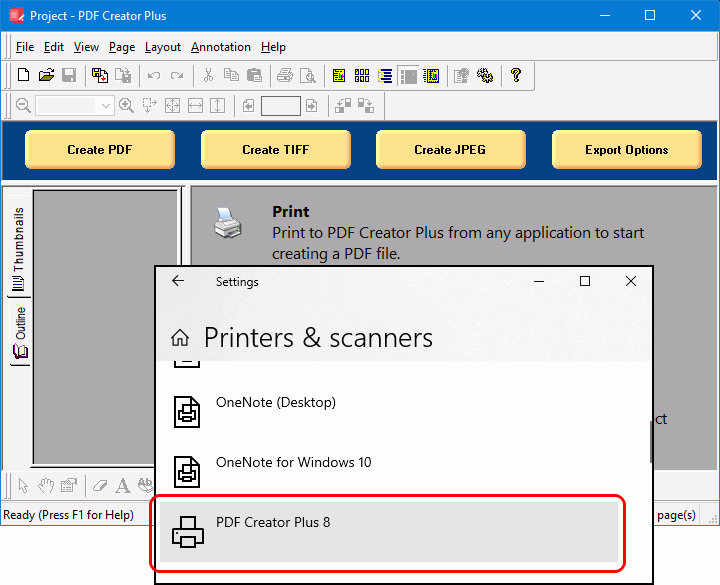
Convert to PDF from any document with the PDF Creator Plus 8 app and printer added to your computer.

Open your PowerPoint presentation in Microsoft PowerPoint and select File->Print from the application menu.
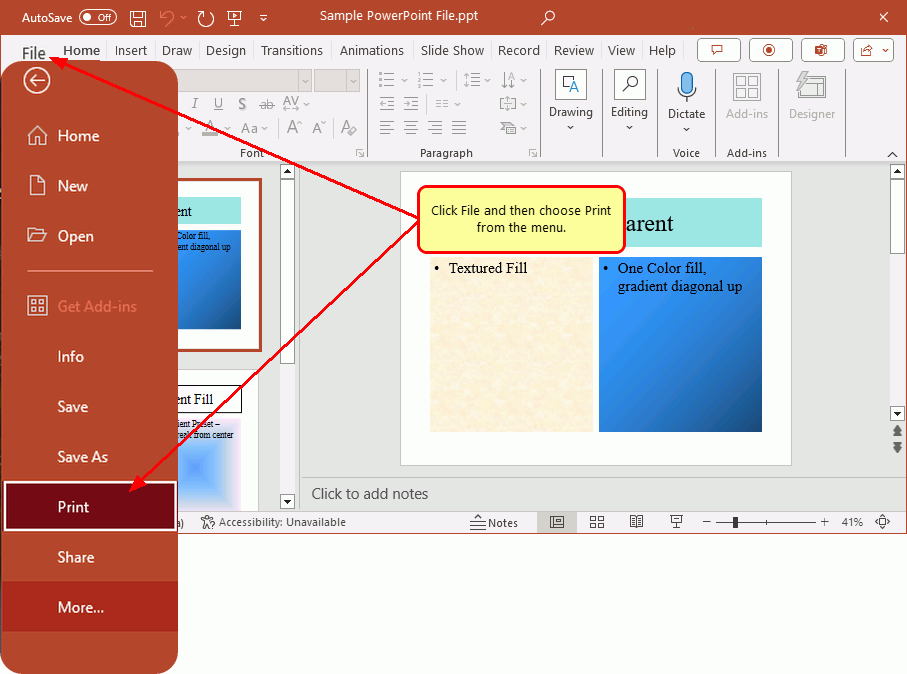
Open your PowerPoint presentation. Click File and then choose Print from the menu.

In the Print options screen, select any printing options for your PPT presentation. Next, choose PDF Creator Plus 8 from the list of printers and click the Print button to begin. 
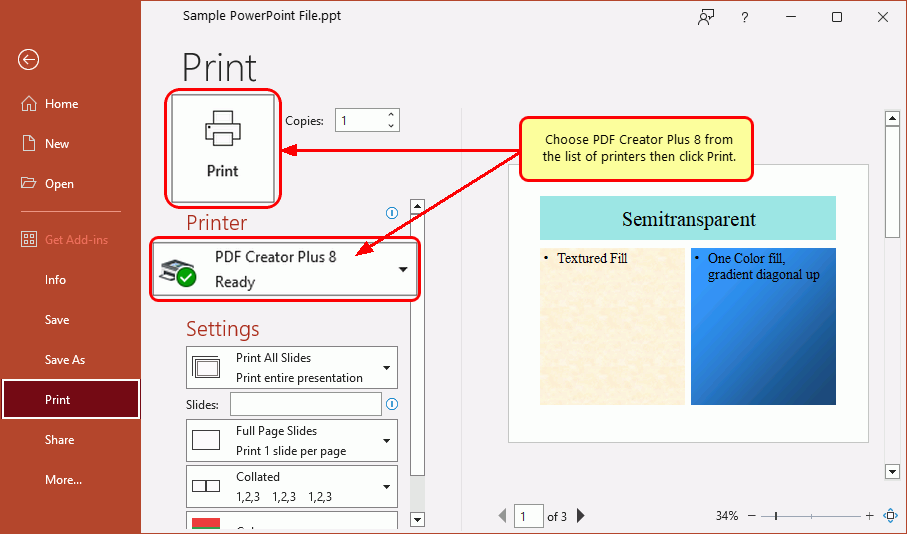
Select PDF Creator Plus 8 from the list of printers then click the Print button to convert PowerPoint to PDF.

Working With PPT and PPTX Presentations and Other Files in PDF Creator Plus

The PDF Creator Plus 8 printer sends the pages from your PPT or PPTX presentation to the PDF Creator Plus app. 

In the app, you can use the included tools to annotate the pages with text, shape, and images. You can also add, move, rotate, and delete unwanted pages before creating your PDF file.

Although printing the pages of your PowerPoint presentation does not keep any outline or hyperlink information, there are annotation tools for adding outline headings and hyperlinks back on your pages. See Creating An Outline/Bookmarks in PDF Creator to learn how to add outline information to your pages before creating your PDF. Subsequently, for hyperlinks, see our article How do I add a hyperlink to a PDF Creator Plus Project?

At this stage, click the Create PDF button to convert your PPT to PDF or continue printing to add other documents.
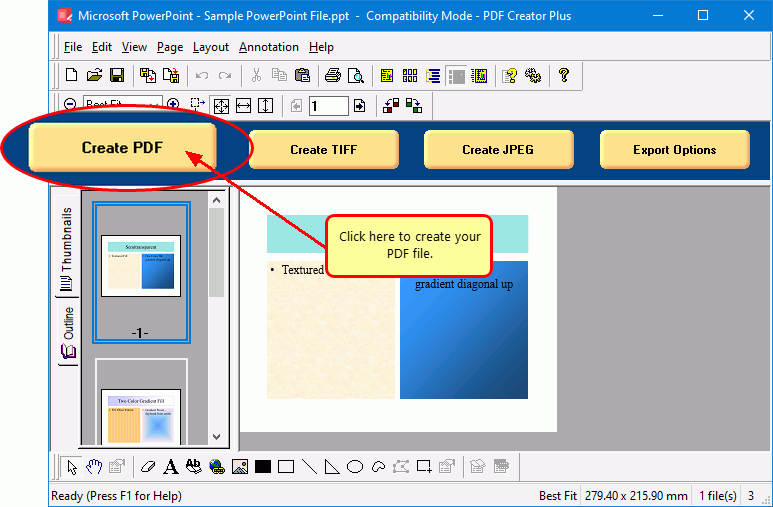
Click the Create PDF button to save the pages of your PowerPoint presentation to PDF.

Saving PowerPoint as PDF

In the Create File dialog, edit the name for your new PDF file and choose where to save it. Next, choose options for your PDF file:

  • Select PDF file (*.pdf) as the Save as type.
  • Check the Multipaged PDF and Embed fonts options.
  • If you added hyperlinks or outline information annotations by hand, check the options for Create hyperlinks, Create outlines, or both.
  • Keep the Open file option enabled to open PDF automatically upon creation.

Finally, click the Save button when you are ready to convert your PowerPoint presentation to PDF.
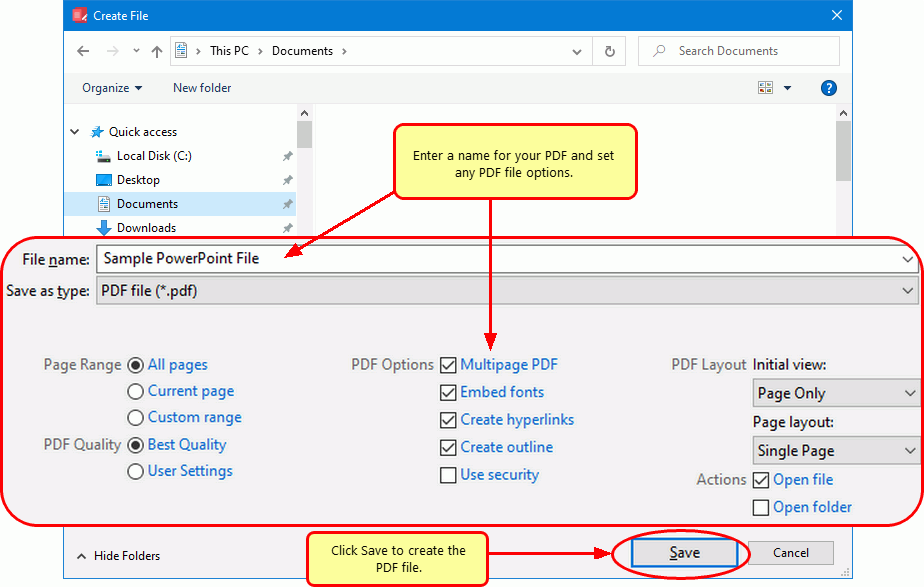
Type a name and choose the save location, then click Save to create your PDF.

A progress dialog will appear as PDF Creator Plus creates your new PDF. If you need to change your PDF, use the Cancel button to stop the process. You can then make your changes and start again.
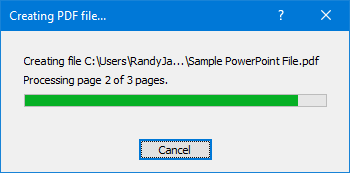
A progress dialog tracks the creation of your PPT or PPTX  to PDF.
https://www.peernet.com/wp-content/uploads/powerpoint-to-pdf-post.png 600 900 Robert Massart https://www.peernet.com/wp-content/uploads/peernet-logo.png Robert Massart2013-07-10 18:33:122023-10-06 10:41:34PPT to PDF: Convert PowerPoint to PDF
  • Document Conversion Service
  • TIFF Image Printer
  • Raster Image Printer
  • PDF Image Printer
  • PDF Creator Plus
  • File Conversion Center
  • PEERNET Reports
Search Search

Recent Posts

  • PNSrv11Lib to PNSrv12Lib: Migration Made Easy
  • Migrating to Version 12: Compatibility Mode Quick Start Guide
  • Well Logs: Stitch PDF Pages into a Continuous TIFF Image
  • Dynamic Stamp Content
  • Convert to PDF: The Power of On-Premise PDF Creation

INTERESTING LINKS

Below are some interesting links for you! Enjoy your stay :)

RSS Feed Logo RSS Feed Logo Subscribeto RSS Feed

OUR PRODUCTS

  • Document Conversion Service
  • TIFF Image Printer
  • Raster Image Printer
  • PDF Image Printer
  • PDF Creator Plus
  • File Conversion Center
  • PEERNET Reports

LATEST NEWS

  • PNSrv11Lib to PNSrv12Lib: Migration Made EasyMarch 14, 2025 - 2:10 pm
  • Migrating to Version 12: Compatibility Mode Quick Start GuideMarch 14, 2025 - 2:09 pm
  • Well Logs: Stitch PDF Pages into a Continuous TIFF ImageMarch 14, 2025 - 2:08 pm
  • Dynamic Stamp ContentNovember 4, 2024 - 4:47 pm

BUSINESS INFORMATION

Toll Free: 1-800-883-7980 North America

Tel: 1-613-224-6894

Our office hours are Monday to Friday, from 0900 hrs to 1700 hrs, Eastern Standard Time.

Email Address: [email protected]
Copyright © 1997-2026. All rights reserved. Terms and Conditions | Disclaimer | Privacy Policy | Trademarks.
PEERNET® is a registered trademark of PEERNET Inc.
  • Link to Youtube
  • Link to Rss this site
  • Products
  • Purchase
  • Company
  • Contact
Link to: Convert JPG to PDF with PDF Creator Plus Link to: Convert JPG to PDF with PDF Creator Plus Convert JPG to PDF with PDF Creator Plus Link to: Convert HTML to PDF with PDF Creator Plus Link to: Convert HTML to PDF with PDF Creator Plus Convert HTML to PDF with PDF Creator Plus
Scroll to top Scroll to top Scroll to top